Measurements from a tape rarely look like ordinary calculator numbers. A cut list may combine feet, whole inches, and fractions such as 3/4 or 5/16, while a drawing may introduce meters or centimeters. A useful feet and inches calculator app lets you enter those measurements in their familiar form and continue working without first turning everything into decimals.
Construction Calculator is included in Unit Converter and is free to download for Android, iPhone, and iPad. Its Length mode can add and subtract measurements, multiply or divide a length by a quantity, convert between supported metric and imperial formats, step through repeated layout marks, and save measurements for later calculations.


How to add feet and inches with fractions
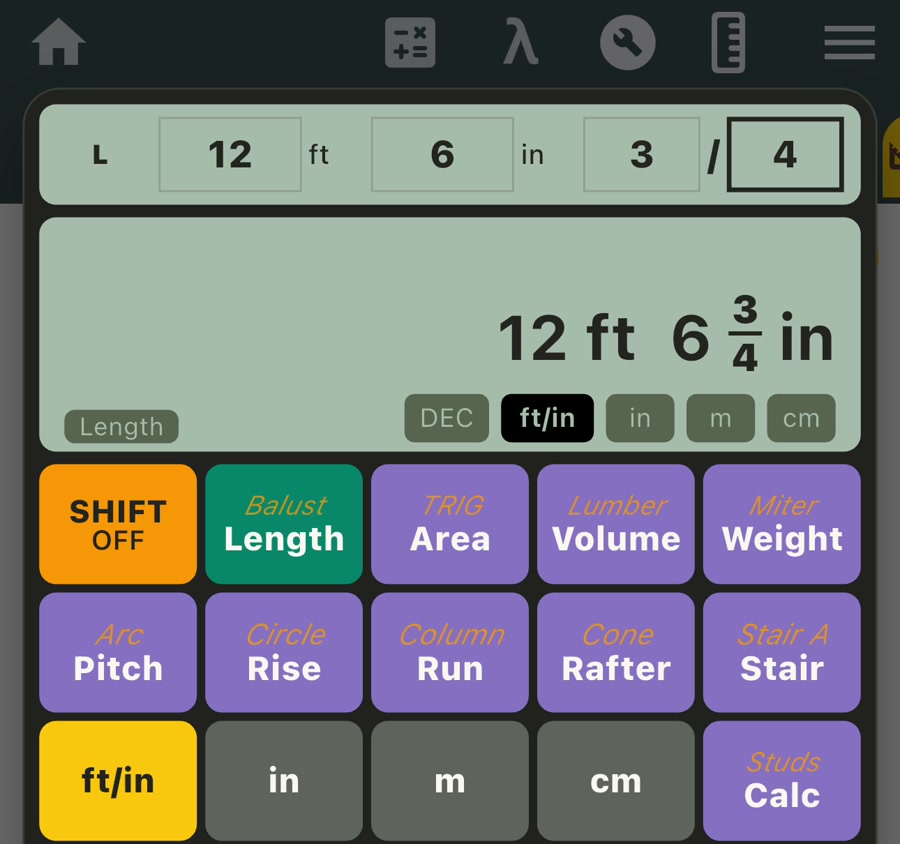
Adding tape measurements by hand means keeping three parts organized: feet, inches, and the inch fraction. Fractions with different denominators must be combined correctly, a whole inch may carry from the fraction, and every 12 inches carries into another foot. Direct FT/IN entry lets the calculator handle that measurement arithmetic while leaving the answer in a format that still matches your tape and cut list.
For example, imagine two uninterrupted wall runs for baseboard. The first measures 12 ft 6 3/4 in, and the second measures 9 ft 11 1/2 in.
- Open Construction Calculator and select Length.
- Select FT/IN.
- Enter 12 ft 6 3/4 in, then press +.
- Enter 9 ft 11 1/2 in, then press =.
The result is 22 ft 6 1/4 in. The feet, inches, and simplified fractional inch remain visible together, giving you a useful combined run for planning the work.

Watch the feet-and-inches calculation
See how the two fractional measurements are entered in Length mode and combined into a 22 ft 6 1/4 in result.
Enter a tape-measure fraction directly
A feet and inches calculator with fractions is most useful when it does not force a familiar measurement into an unfamiliar input. With FT/IN selected, the active line has separate positions for feet, inches, fraction numerator, and fraction denominator. The on-screen left and right controls move between those positions, so values such as 7 ft 4 5/16 in can be entered as written.
Length mode also supports decimal inches, meters, and centimeters. Different supported units can be used across input lines when a calculation brings together measurements from more than one source. Result-unit controls then let you view a compatible answer in the format that suits the next step.
Multiply feet and inches by a quantity
A multiply feet and inches calculator helps when the same measured part appears many times in a cut list. Suppose ten blocking pieces are each 2 ft 7 in long. Enter 2 ft 7 in, press multiply, enter the unitless quantity 10, and press equals. The total is 25 ft 10 in.
The same approach works for repeated trim pieces, cleats, rails, boards, or other equal lengths. You can also divide a total length by a plain number when you want to split a measurement into equal parts. In both cases, the result remains a length rather than becoming a unitless decimal.
Convert meters or centimeters to feet and inches
Metric drawings and imperial site measurements often meet on the same project. In Length mode, enter the supplied value using M or CM, then select FT/IN to view the measurement in feet, inches, and a fractional inch. There is no need to type the value again in a separate converter.
If a drawing gives a clear opening as 2.4 m, switching its visible format to FT/IN shows 7 ft 10 1/2 in at the calculator’s fraction precision. This makes it easier to compare a metric drawing with an imperial tape while retaining the original measurement for further calculations.
For a conversion-only check, Unit Converter also includes a Meter ⇄ Foot converter that can show decimal feet and a feet-and-inches result together. This gives you a quick comparison screen when you need the converted formats rather than a longer construction calculation.

Step through repeated layout marks
Some jobs need a sequence of cumulative positions rather than one final total. Length mode’s Repeat Add behavior can step through equal spacing from the same reference point. Enter 16 in, press plus once to begin the addition, and press plus again to show 32 in. Each additional press advances to 48 in, 64 in, 80 in, 96 in, and later marks.
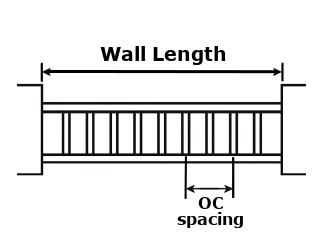
This is useful for quickly reading repeated positions for studs, joists, blocking, posts, or evenly spaced parts. When you need a complete stud count and adjusted spacing for a known wall length, the dedicated Studs tool provides that related workflow inside the same Construction Calculator.
Save a measurement and use it again
A measured value often belongs in more than one calculation. Memory lets you store the displayed measurement, review saved items, and insert a compatible value into a later input. This reduces repeated entry when the same dimension is used across length, area, volume, or another supported workflow.
For a square platform measuring 2.4 m on each side, enter 2.4 m once and save it with M+. Open Area mode, insert the stored length into both the length and width inputs, and calculate. The result is 5.76 sq m, while the original side measurement remains available in memory.
Who can use a feet and inches calculator?
Carpenters and trim installers can combine room runs and repeated cut lengths. Woodworkers can total parts that use fractional inches. Framers can step through regular layout marks. Remodelers, flooring installers, cabinetmakers, estimators, and DIY users can keep tape measurements readable while moving between calculations. The metric options are also useful when drawings, materials, and site tools use different measurement systems.
Because the feature sits inside Unit Converter, the same download also provides broader conversion categories, a scientific calculator, 42 Helpful Tools, and dedicated construction workflows for roofs, stairs, balusters, studs, lumber, miters, areas, volumes, weights, and common shapes.
What makes a feet-and-inches calculator useful?
The right app should support the way measurements are actually recorded and help carry a result into the next job. Useful qualities include:
- Direct fractional entry: Feet, inches, numerator, and denominator remain clear.
- Measurement arithmetic: Add or subtract lengths and scale them with a plain quantity.
- Metric and imperial formats: Move between FT/IN, decimal inches, meters, and centimeters.
- Readable results: Keep compatible output units available without rebuilding the calculation.
- Repeated workflows: Step through equal marks and save useful measurements in memory.
- Related project tools: Continue into area, volume, roofing, stairs, layout, and lumber calculations when needed.
Frequently asked questions
Is the feet and inches calculator free to download?
Yes. Unit Converter is free to download from Google Play and the App Store, and Construction Calculator is included within the app.
Can it add and subtract fractional-inch measurements?
Yes. Select Length and FT/IN to enter feet, inches, and fractional inches. You can then add or subtract another compatible length and keep the result in feet-and-inches format.
Can it multiply a measurement by the number of pieces?
Yes. Enter the length, press multiply, and enter a plain quantity. The result remains a length, making it useful for repeated pieces in a cut list.
Can it convert metric measurements to tape-measure fractions?
Yes. Enter a supported measurement in meters or centimeters, then select FT/IN to display the corresponding feet, inches, and fractional-inch value.
Does it work on Android, iPhone, and iPad?
Yes. Unit Converter is available from Google Play for Android and from the App Store for iPhone and iPad.
Keep measurement math ready for the next project
Use Unit Converter to add tape measurements, scale repeated pieces, convert metric dimensions, and keep useful values ready for the next calculation. You can also explore the broader Construction Calculator app guide for its roof, stair, railing, framing, lumber, and geometry tools.
Download Unit Converter on the App Store for iPhone or iPad, or get Unit Converter on Google Play for Android.