Before buying drywall or comparing panel sizes, you need a reliable total for the surfaces you plan to cover. A drywall square footage calculator turns wall and ceiling measurements into the area needed for the next stage of your estimate.
Unit Converter makes this practical when tape measurements include feet, inches, and fractions. Use Area mode for one wall, combine rectangular areas for a room, and review the total in square feet or square meters. Unit Converter is free to download for Android, iPhone, and iPad.


How to measure walls for drywall
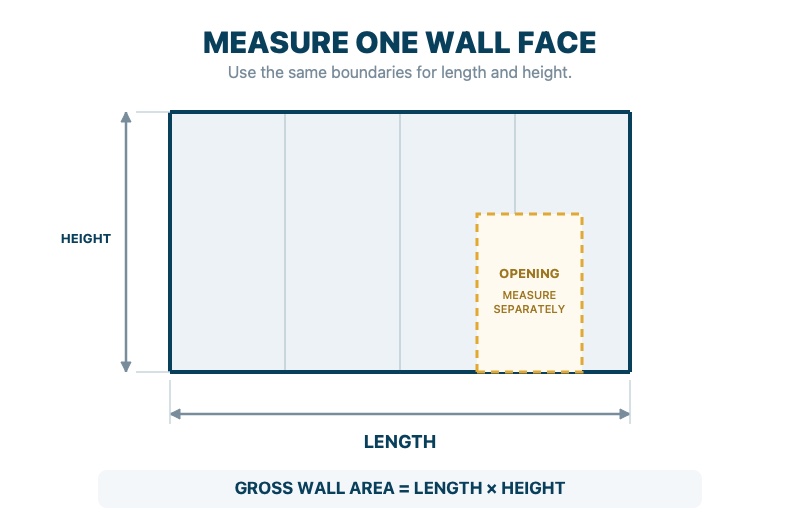
Knowing how to measure walls for drywall starts with recording the length and height of each rectangular wall face. Measure the actual surfaces in the project rather than assuming every wall has the same height.
Wall area = wall length × wall height
If all the walls in a room have the same height, you can add their lengths to create one total wall run and multiply it by the height. When heights differ, calculate each rectangle separately and add the areas. Measure a drywall ceiling as its own rectangle using ceiling length × ceiling width.
How to calculate drywall square footage
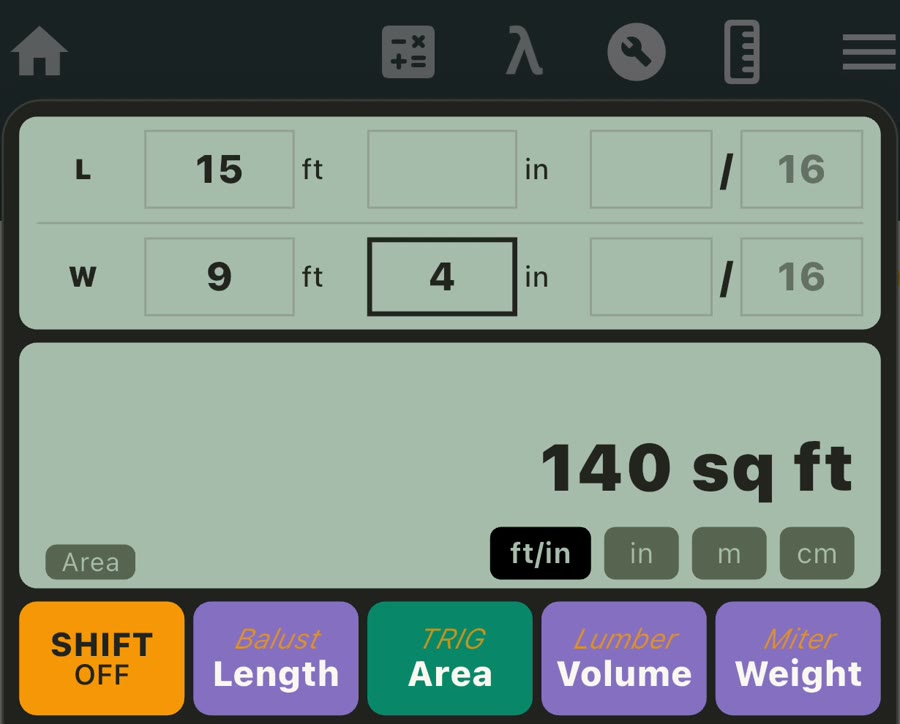
Consider one wall that is 15 ft long and 9 ft 4 in high. The extra four inches matter: 9 ft 4 in equals 9⅓ ft, not 9.4 ft. Multiplying 15 ft by 9⅓ ft gives 140 sq ft of gross wall-face area.
Unit Converter handles the feet-and-inches entry directly:
- Open Construction Calculator and make sure Shift is off.
- Select Area.
- Keep ft/in selected.
- Enter 15 ft in L for the wall length.
- Use W as wall height and enter 9 ft 4 in.
- Read the automatically updated result: 140 sq ft.
There is no need to convert the height to decimal feet first. Each Area input can independently use feet and inches, decimal inches, meters, or centimeters, while the result can be displayed as square feet, square inches, square meters, or square centimeters.
Watch the drywall area calculation
See how the wall length and feet-and-inches height are entered in Area mode to produce the 140 sq ft result.
Build the total for several walls and a ceiling
For a complete room, calculate the surfaces that belong in the project scope and combine them:
- Several walls: use addition to combine separately measured rectangular wall areas.
- Matching wall faces: multiply one displayed area by the number of identical faces.
- Walls with different heights: calculate each section on its own instead of using one assumed height.
- Ceiling: calculate its length × width area and add it when the ceiling will also receive drywall.
- Both sides of a partition: include each finished face in the project total.
Breaking the room into simple rectangles keeps the measurements easy to review and makes it straightforward to update one section if the plan changes.
Keep gross area or subtract selected openings
Manufacturer guidance differs. CertainTeed retains doors and windows in gross area, while USG/CGC says to subtract large openings but ignore small penetrations. Begin with gross area, then follow the method used for the selected product and layout.
When your method calls for an opening to be removed, calculate its rectangular area and subtract it from the wall total. The app supports both workflows: retain the gross area as displayed, or subtract the selected opening areas to produce the total your estimate requires.
Use square footage for panel planning
Once you know the area to cover, compare it with the coverage of the panel size selected for the project:
| Panel size | Face area |
|---|---|
| 4 ft × 8 ft | 32 sq ft |
| 4 ft × 10 ft | 40 sq ft |
| 4 ft × 12 ft | 48 sq ft |
For the 140 sq ft wall, 140 ÷ 32 = 4.375, which rounds to five panels in an area-only comparison. Finalize the purchase quantity after considering orientation, seams, usable offcuts, openings, and the project-approved allowance.
Frequently asked questions
How do I calculate the square footage of a room for drywall?
When learning how to calculate square footage of a room for drywall, add the lengths of the walls and multiply that total by the wall height when the height is consistent. If heights differ, calculate each wall separately and add the results. Include the ceiling area when it is part of the drywall project.
Should doors and windows be subtracted?
Start with gross wall area, then follow the method used by the selected manufacturer, supplier, or estimator. Unit Converter lets you keep that gross total or subtract the rectangular area of selected openings.
How many square feet does a 4 × 8 drywall panel cover?
A 4 ft × 8 ft panel has a face area of 32 sq ft. Divide the area to cover by the selected panel’s face area, round up to a whole panel, and then account for the planned layout and project allowance.
Can I enter feet, inches, and fractions?
Yes. Area mode accepts feet with whole and fractional inches, along with decimal inches, meters, and centimeters. This is particularly useful for heights that are not an exact whole number of feet.
Is the drywall square footage calculator free to download?
Yes. Unit Converter is free to download from Google Play and the App Store, and Area mode is included in its Construction Calculator.
Calculate the area before planning the panels
Measure the wall and ceiling surfaces, enter the dimensions as they appear on your tape or plan, and combine the relevant areas into one clear total. For more dimensional and jobsite workflows, visit our Construction Calculator app guide. For help with mixed feet, inches, and fractions, see our feet and inches calculator app guide.
Download Unit Converter on the App Store for iPhone or iPad, or get Unit Converter on Google Play for Android.