A crown molding angle calculator turns two measurements—the molding spring angle and the wall corner angle—into useful miter-saw settings. It gives you the miter and bevel for cutting crown flat, plus the miter setting for cutting it nested.
Unit Converter includes this Crown / Compound workflow inside its Construction Calculator. Enter the measured angles, move through the labeled results, and compare the two cutting methods without working through compound-angle formulas by hand. Unit Converter is free to download for Android, iPhone, and iPad.


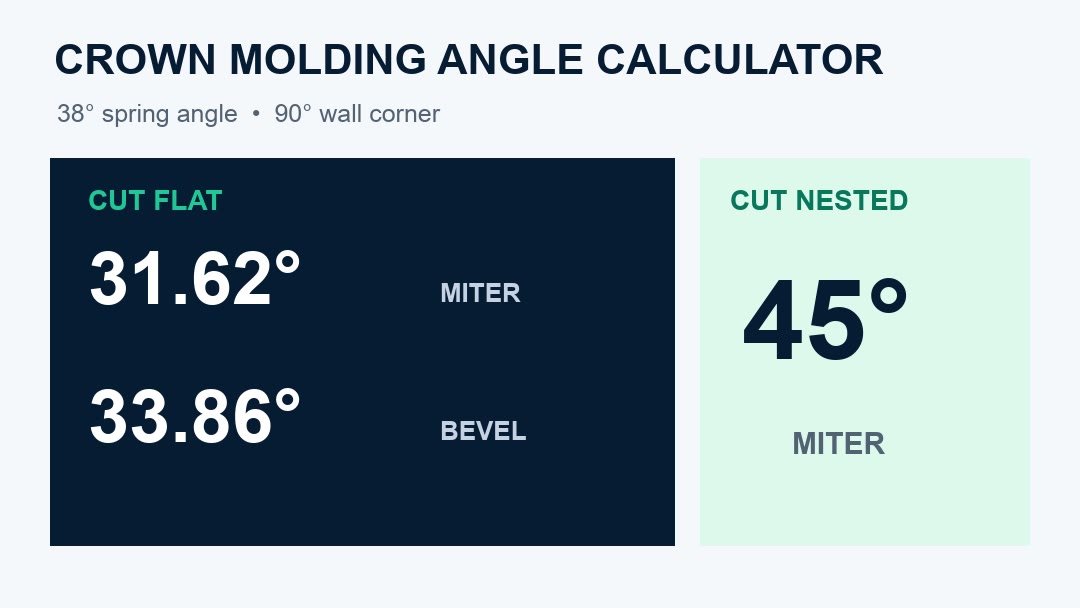
Start with the spring angle and wall angle
The spring angle describes how the crown sits between the wall and ceiling. The wall angle describes the corner where the two walls meet. They are different measurements, and both affect the saw settings when crown is cut flat.
The tool begins with a 38° spring-angle default, but you can replace it with the value for the molding you are installing. The Kreg Crown-Pro manual identifies 38°, 45°, and 52° as common spring angles. Use the actual profile information or measurement for your project, then enter the measured wall corner.
Example: 38° crown at a 90° wall corner
For the verified example, leave Spring Angle at 38° and enter 90° for Wall Angle. Press Next to review these settings:
- Flat Miter Angle: 31.62°
- Flat Bevel Angle: 33.86°
- Nested Miter Angle: 45°
- Spring Angle: 38°
- Wall Angle: 90°
The flat values closely match the familiar 31.6° miter and 33.9° bevel detents documented for this setup in the Bosch miter-saw manual. Unit Converter displays the calculated flat-cut values with two decimal places.
How to calculate crown molding angles in Unit Converter
- Open Construction Calculator.
- Press Shift, then Weight to open Miter.
- Choose Crown / Compound from the Miter Type menu.
- Enter the crown molding Spring Angle.
- Enter the measured Wall Angle.
- Read the first result, then press Next to review the remaining settings and entered angles.
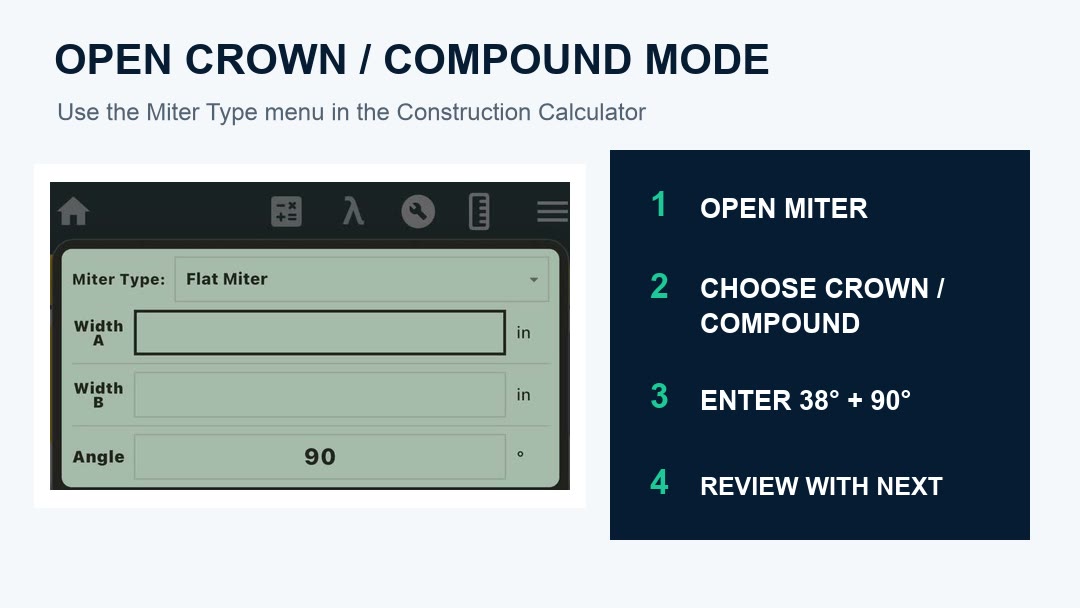
The workflow keeps the input measurements and answers labeled, making it easy to return to the wall or spring angle and recalculate when the next corner or molding profile is different.
Cutting crown flat: use the miter and bevel together
When crown molding lies flat on the saw table, the cut is compound. For the 38°/90° example, use the calculated 31.62° flat miter and 33.86° flat bevel values together with the setup described by the saw manufacturer.
This is where a crown molding compound angle calculator is especially useful: changing either the spring angle or wall angle recalculates both settings, so you are not limited to one row in a fixed chart.
Cutting crown nested: use the nested miter result
When crown is held nested at its installed spring angle, use the Nested Miter Angle result. For the same 38° spring and 90° wall example, the calculator displays 45°.
Hold and support the molding using the method specified for the crown profile, jig, and saw. Keeping the flat and nested answers on separate result pages helps prevent one setup from being applied to the other.
Why the measured wall angle matters
A crown molding miter angle calculator becomes more valuable when the corner is not exactly the nominal angle. Measure the wall corner you are fitting and enter that value instead of assuming every corner is 90°.
The app then recalculates the flat miter, flat bevel, and nested miter from the same measured corner. This creates a repeatable workflow for moving around a room: measure, enter, review the appropriate result, and label the matching piece.
Prepare the cut before using finish material
- Confirm the molding spring angle from the profile information or a careful measurement.
- Measure the actual wall corner that the two pieces will meet.
- Decide whether the crown will be cut flat or nested before choosing a result.
- Mark the top, bottom, left, and right of each piece so its orientation stays clear.
- Apply the angle magnitude in the correct direction for the marked piece and saw setup.
- Follow the saw and molding manufacturer instructions, then test the settings on scrap before cutting the finish length.
A short scrap test lets you check the measured corner, molding position, saw direction, and calculated settings together before moving to the finished material.
Frequently asked questions
What angles does the calculator need?
Enter the crown molding spring angle and the wall corner angle. The calculator returns the flat miter, flat bevel, and nested miter settings.
What are the settings for 38-degree crown at a 90-degree corner?
The verified example returns a 31.62° miter and 33.86° bevel when cutting flat, or a 45° miter when cutting nested.
What is the difference between cutting crown flat and nested?
Cutting flat places the molding flat on the saw table and uses both a miter and bevel setting. Cutting nested holds the molding at its installed spring angle and uses the Nested Miter Angle result.
Should I measure the actual wall angle?
Yes. Entering the measured corner lets the app calculate settings for that corner rather than relying only on a nominal 90° value.
Can I use a spring angle other than 38 degrees?
Yes. The 38° value is the tool default and is editable. Enter the spring angle for the molding profile you are using.
Is the crown molding calculator free to download?
Yes. Unit Converter is free to download from Google Play and the App Store, and Crown / Compound mode is included in its Construction Calculator.
Calculate crown molding saw settings
Measure the spring angle and wall corner, choose Crown / Compound, and review the flat and nested settings for the way you plan to cut. For trim lengths and fractional measurement math, see our feet and inches calculator app guide. For the complete collection of construction modes, visit our Construction Calculator app guide.
Download Unit Converter on the App Store for iPhone or iPad, or get Unit Converter on Google Play for Android.