Scoreboard Plus includes a dedicated Score Keeper mode for board games and family game nights, with a round-by-round score sheet for two to six players. The Android app is free to download and adds up each player’s points as you play.
Keep everyone’s rounds and running scores on one digital score sheet. As friends or family take turns playing, enter the points, check the totals and continue the game. Names and avatars make it easy to see whose column you’re updating.

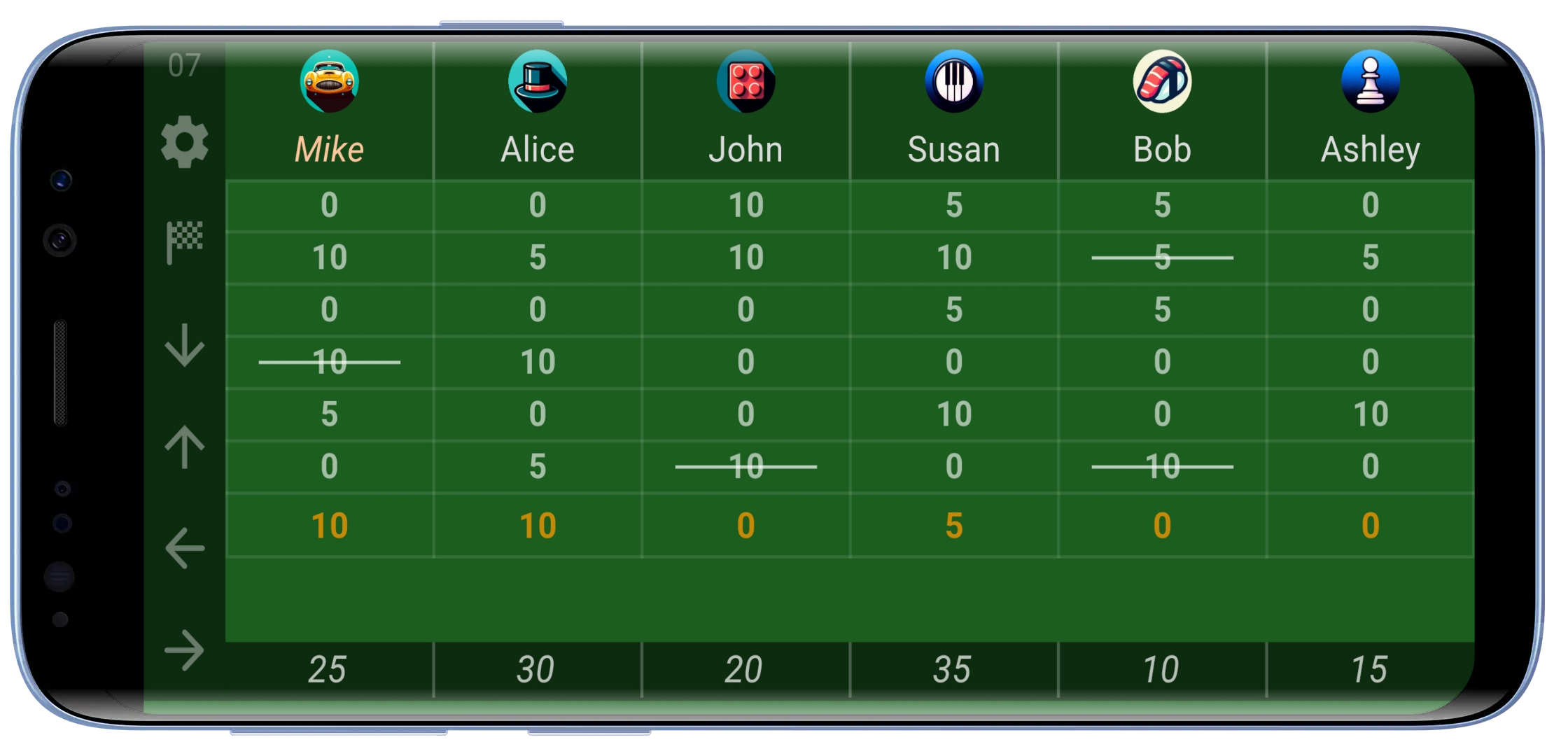
A board game score keeper app for two to six players
Open Score Keeper in Scoreboard Plus, then use the settings button to choose the number of players. Give each person a name and avatar, or select a saved profile for someone you play with regularly.
Each player gets a column. The rows hold the points from individual rounds, and the totals sit along the bottom. You can follow one person’s scores down their column or compare everyone’s points for the same round across a row.
That layout works for a quiet two-player game as well as a full table of six. The opening image shows a six-player session with several rounds already entered, so you can see both the individual entries and the running totals.
Score Keeper fits turn-based games where points build up over several turns or rounds. For a word or tile game, record the points each person earns as you play. For a family dice game or a tabletop challenge, enter each round’s results. You decide the points using your game’s rules; the sheet keeps them organised and adds them up.
Choose whether the highest or lowest score wins
Before you begin, set Winning Rule to match how your group is scoring the game:
- Highest Score: use this when players are collecting points and the largest final total wins.
- Lowest Score: use this when points count against players and the smallest final total wins.
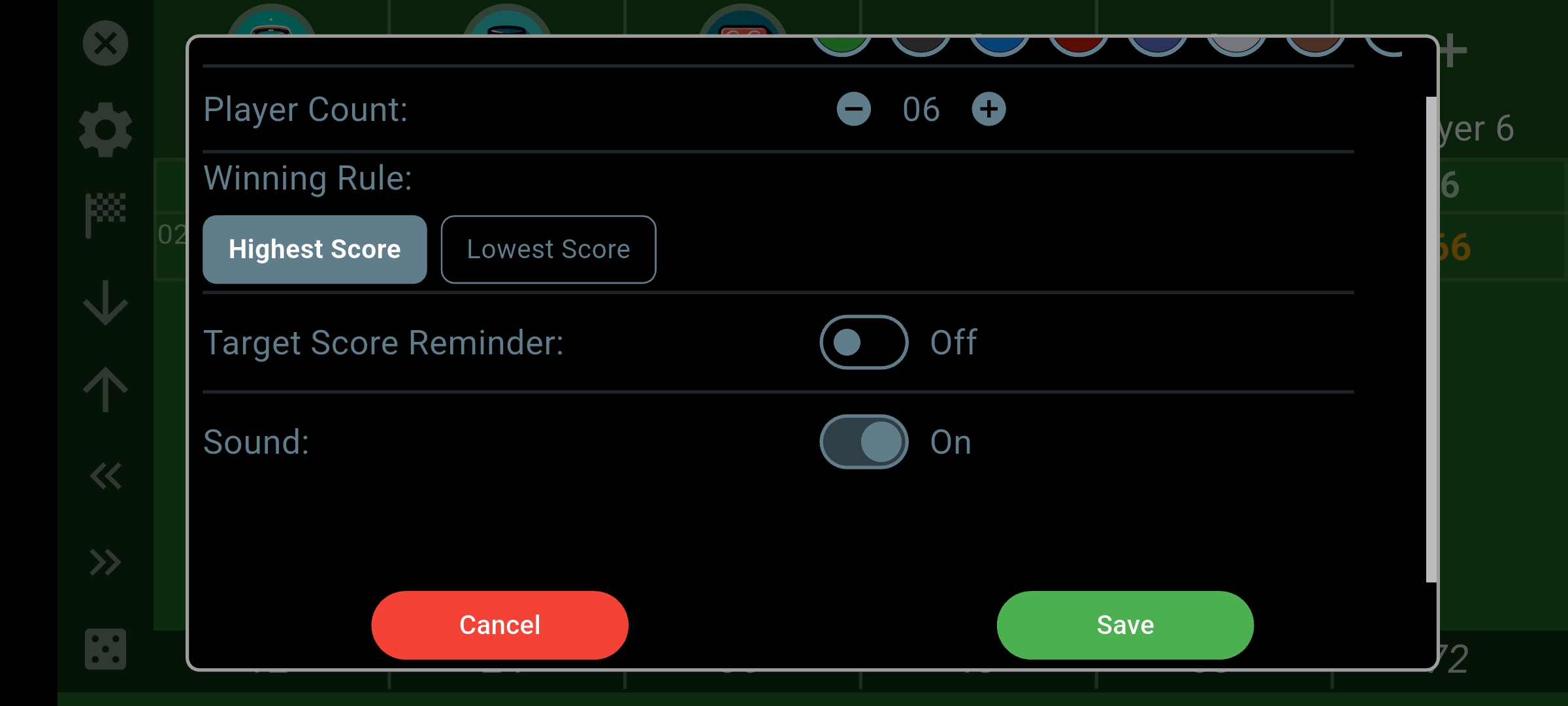
You enter the points for each turn or round according to the game you’re playing; the board keeps the running totals and uses your chosen rule when you finish. It’s useful when one game night rewards collecting points and the next is all about avoiding them.
If your group plays toward a particular score, you can also enable Target Score Reminder. It adds a visible reminder when a player’s total reaches or passes the value you’ve chosen, helping you notice that point in the game.
Enter each round’s points and let the totals update
When it’s time to record points, add them to the current round:
- Tap a score cell in the round you want to fill in.
- Enter that player’s points using the keypad.
- Use the arrows at the top of the keypad to move between players, then close it when you’re done.
- Use the down arrow on the score sheet to advance to the next round when you’re ready.
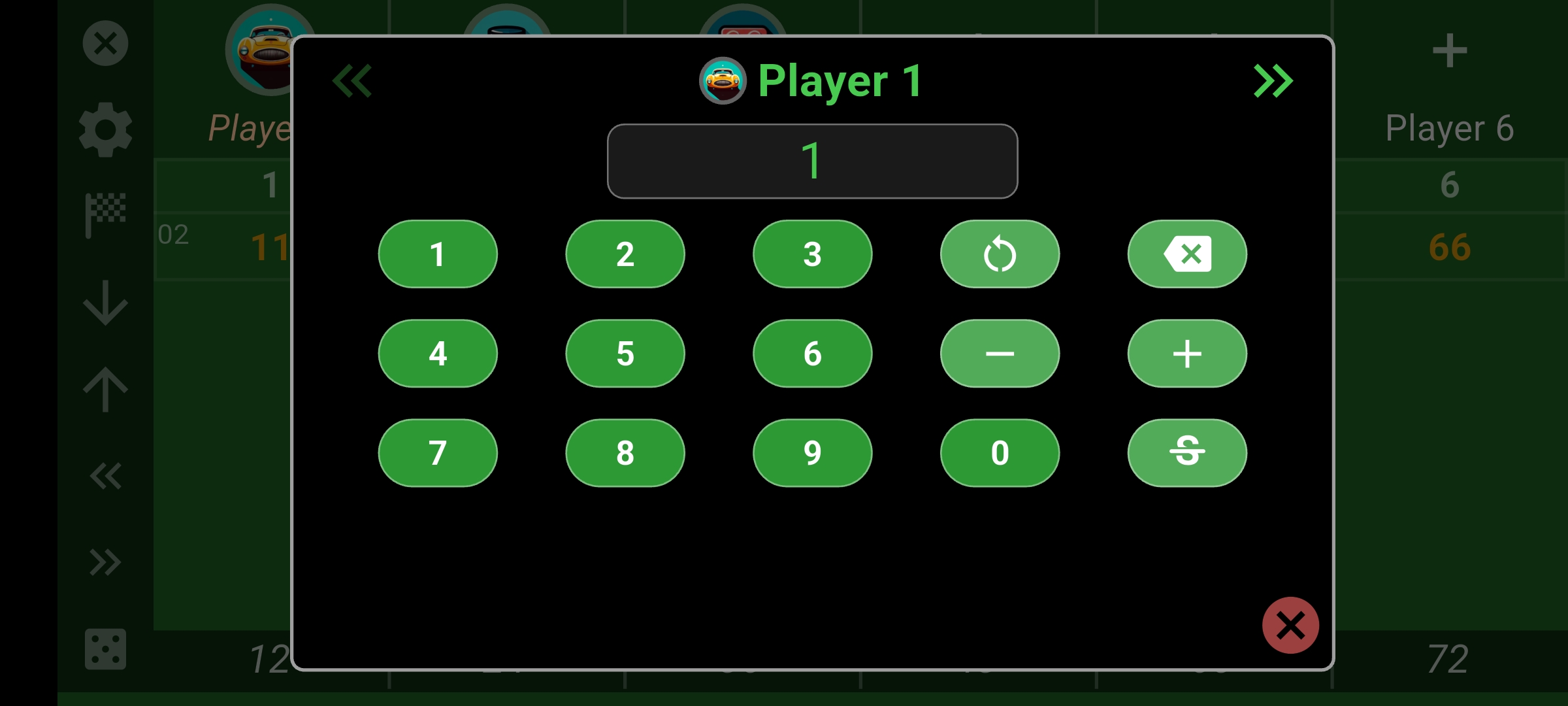
The total for each player updates as you enter their points. You can record a different amount for every person without repeatedly tapping a plus button, and each round stays separate on the sheet.
If everyone wants to check the standings before the next round, the totals are already there. You can also look back through the current game’s earlier rounds to see where someone pulled ahead.
Correct a score without rewriting the rest of the sheet
If someone spots an entry mistake, tap that score cell again—even if it’s from an earlier round—and enter the corrected points. The running total updates to match, so the correction doesn’t leave you with a second total to calculate.
The keypad also has a strikethrough control. Use it to leave an entered score visible while excluding it from the total. That’s what the crossed-out entries in the first image show. Toggle the control again if you want that score included once more.
This keeps deliberately excluded scores visibly marked while leaving the rest of the round’s entries intact.
Save the result for your next game night
When you’re finished playing, tap the finish flag and leave Save Match to History selected. The saved result keeps the final player totals, the number of rounds and whether you used the highest- or lowest-score rule.
Using Scoreboard Plus as a board game score tracker also helps you keep a record for your regular group: select player profiles before play and save completed results to their records. Over time, those profiles give you a way to review past results and see how everyone is doing across your game nights.
Frequently asked questions
Is Scoreboard Plus free to download?
Yes. Scoreboard Plus is free to download on Android from Google Play, and the Score Keeper mode is included. Open it to set up a round-based score sheet for two to six players.
Can I also use it as a score keeper app for card games?
Yes. Card games are another good use for the same score sheet. If your group records points after each hand, enter those scores in the player columns and let the running totals update. Choose whether the highest or lowest final total wins.
Can I track a game where the lowest score wins?
Yes. Select Lowest Score under Winning Rule before you start. Keep entering each round’s points normally, and the result will use the lowest final total to determine the winner.
Can everyone see the score sheet on a TV?
Yes. Use your Android device’s screen mirroring feature to show Scoreboard Plus on a compatible TV. You can enter scores on your phone or tablet while the group checks the sheet on the bigger screen.
Have the score sheet ready for your next game night
If you prefer to add points as you play, our scoreboard app for Android also includes head-to-head, group and sports modes.
To use Scoreboard Plus as a board game score keeper app, download it free on Google Play and open Score Keeper. Add your players, choose the winning rule and let the app keep the running totals while you enjoy the game.