Hosting a quiz or a game night? A multiplayer scoreboard app keeps everyone’s points in one place while you get on with the game. Scoreboard Plus includes a dedicated Multi Player mode for 2–16 players, and the app is free to download on Android.
Give each player or team a name and color, then use the plus and minus buttons to update their score. From a family trivia night to a classroom challenge, you can keep a running tally on your phone or tablet, with a timer and target-score reminder available when you need them.

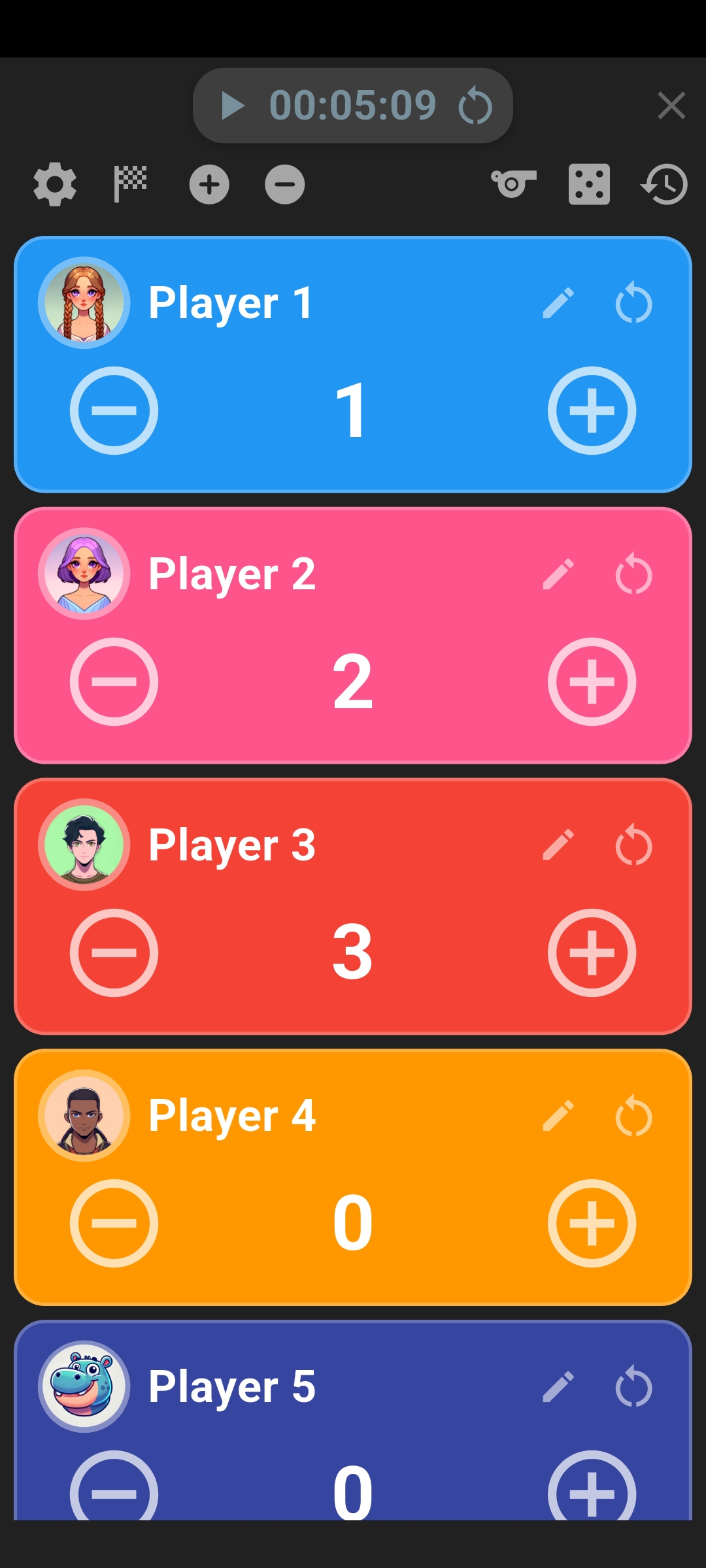
Set up a scoreboard for multiple players
Open Multi Player in Scoreboard Plus and tap the settings gear. Choose the number of players, then tap Save. You can set up a small group or expand the board for a gathering of up to 16.
Tap the pencil on each player card to enter a name and choose a color or avatar. If you’re hosting a team game, use team names instead: each card can hold that team’s combined score. For people you play with regularly, you can select a saved profile to fill in their details.
Use names that are easy to recognize while you’re calling out questions or watching the game. Distinct colors help you find the right card quickly; scroll through the list to reach the rest of your group.
Choose how many points each tap adds
A correct answer, a bonus challenge and a penalty may be worth different amounts. In settings, Increment controls how much a plus press adds, while Decrement controls how much a minus press removes. These amounts apply to every player card.
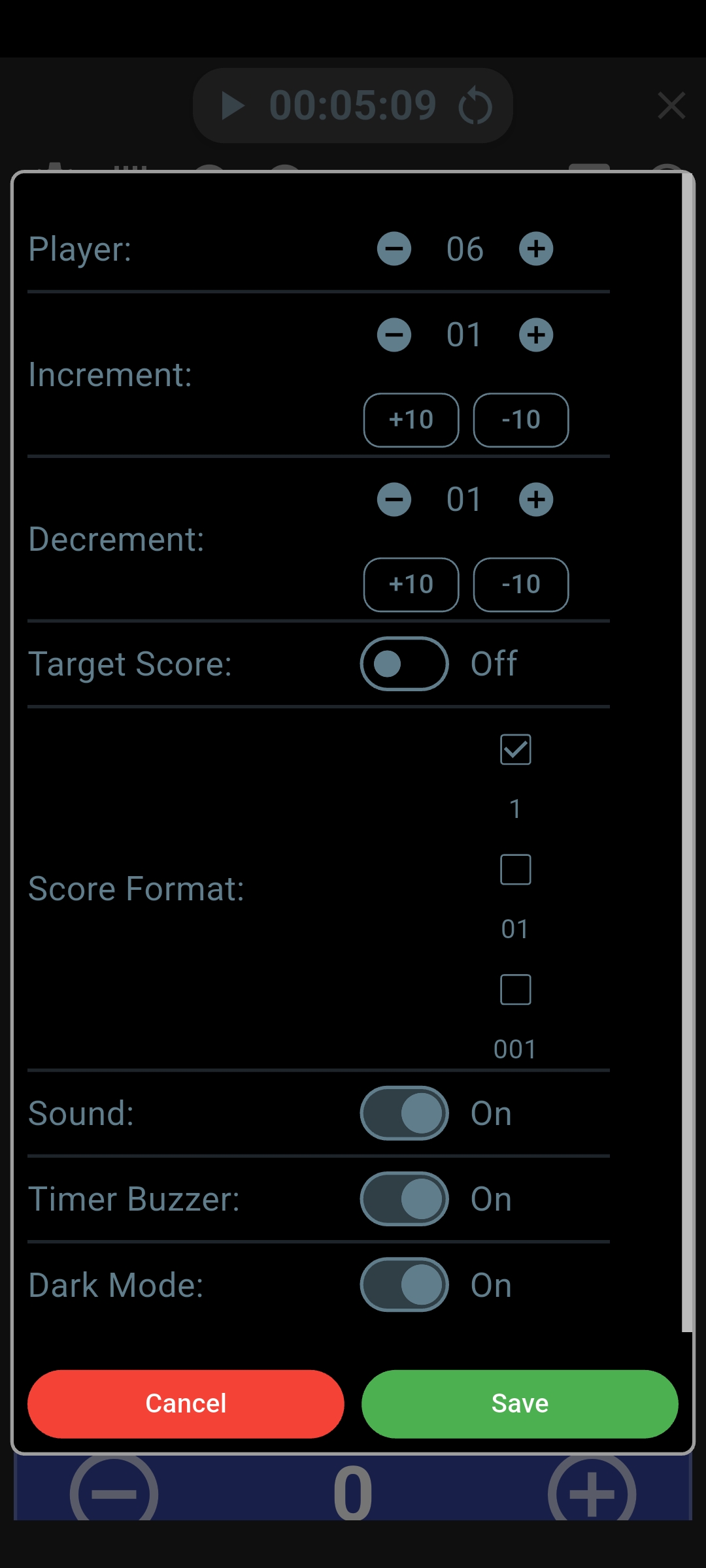
For a straightforward one-point-per-answer quiz, set both amounts to 1. If your game awards 10 points for a successful challenge and deducts 5 for a penalty, set Increment to 10 and Decrement to 5. Tap Save when the values match your rules.
During play, use the plus or minus button on the matching card. To correct a total or enter a larger change directly, tap the large score number and enter the intended total. That is useful when a bonus has a different value from your usual points.
Use it as a quiz scoreboard app
For a quiz at home, give each person or team a card before the first question. As you check the answers, award points to the matching cards. You can update scores after each question or add the points earned when you finish marking a round.
For example, keep one running total for each team through a general-knowledge round, a picture round and a final bonus question. Leave the totals in place between rounds so the group can follow the overall contest. The board handles the tally while you choose the questions and award the points.
For charades or a classroom challenge, a score counter app gives you a quick way to award points as people play. Decide what earns a point before you begin, then update each participant’s card. You can use team totals for group activities or separate cards when everyone is competing individually.
Add a time limit or a target score
A countdown is handy for a quick-fire quiz round or a timed challenge. Tap the timer display to choose the duration and countdown setting. If you’d rather see how long the activity lasts, use count-up mode. The timer stays above the player cards, keeping time and scores together.
For a race to a particular number of points, turn on Target Score in settings and choose the total. When a player reaches it, the app shows an alert. You can choose Continue Playing or Finish Game, which is useful when your house rules call for everyone to finish their turn before you wrap up.
Save the result for your next game night
When the game is over, tap the finish flag and keep Save Match to History checked before confirming. You can revisit the final player scores later using the history button, so the result is still there when someone asks who won last time.
Selecting saved profiles before play also connects completed results to those players’ records. It’s a useful extra for a regular group: familiar names and avatars at setup, with past results to look back on after the game.
Frequently asked questions
Can I use it as a pub quiz scoreboard?
Yes. Set up one card per team, enter the team names and update their totals as you mark the answers. The Multi Player board supports 2–16 cards, so you can keep a shared tally for a small pub quiz or a trivia night with friends.
Can I show the scores on a TV?
Yes. Use your Android device’s screen mirroring feature with a compatible TV. Update the scores on your phone or tablet, and the same board appears on the larger display. For a longer player list, scroll to show the other cards when you review the scores with the group.
Is there a dice roller for group games?
Yes. Tap the dice button in the Multi Player toolbar to roll one or two dice. It’s a handy extra for a tabletop activity or deciding who goes first.
Get the group ready to play
For smaller matchups or games scored round by round, see what else our scoreboard for Android can do.
Download Scoreboard Plus free on Google Play and open Multi Player. Add your players or teams, choose the scoring amounts and keep the points together through your next quiz, party game or friendly challenge.