Scoreboard Plus includes a dedicated two player scoreboard for Android, with large scores, round tracking and an optional timer. The app is free to download and gives friends or family a clear way to follow a head-to-head game.
Use the plus and minus controls to keep both players’ totals up to date. Give each player a name, color and avatar to make the board your own. Whether you’re counting points in a tabletop game, running a two-person quiz or keeping score during practice, both players have a visible total to follow.

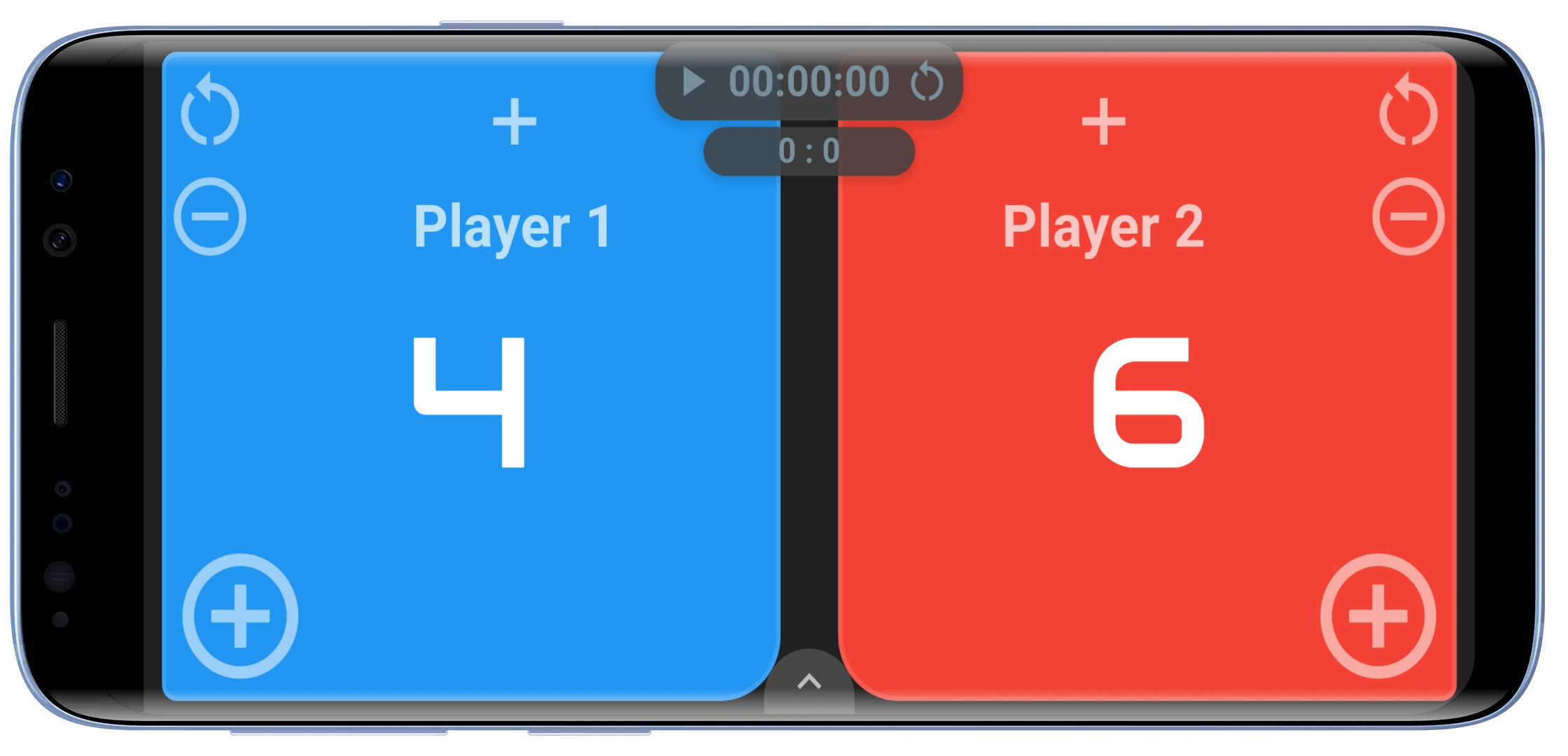
Set up a simple scoreboard for two players
Open the 2 Player board in Scoreboard Plus. Tap the arrow at the bottom to reveal the controls, then open the settings gear.
- Name both players. Enter their names or select saved profiles for people you play with regularly.
- Choose different colors. Give each player a recognizable score panel.
- Set Increment and Decrement. Choose how many points the plus and minus buttons add or remove.
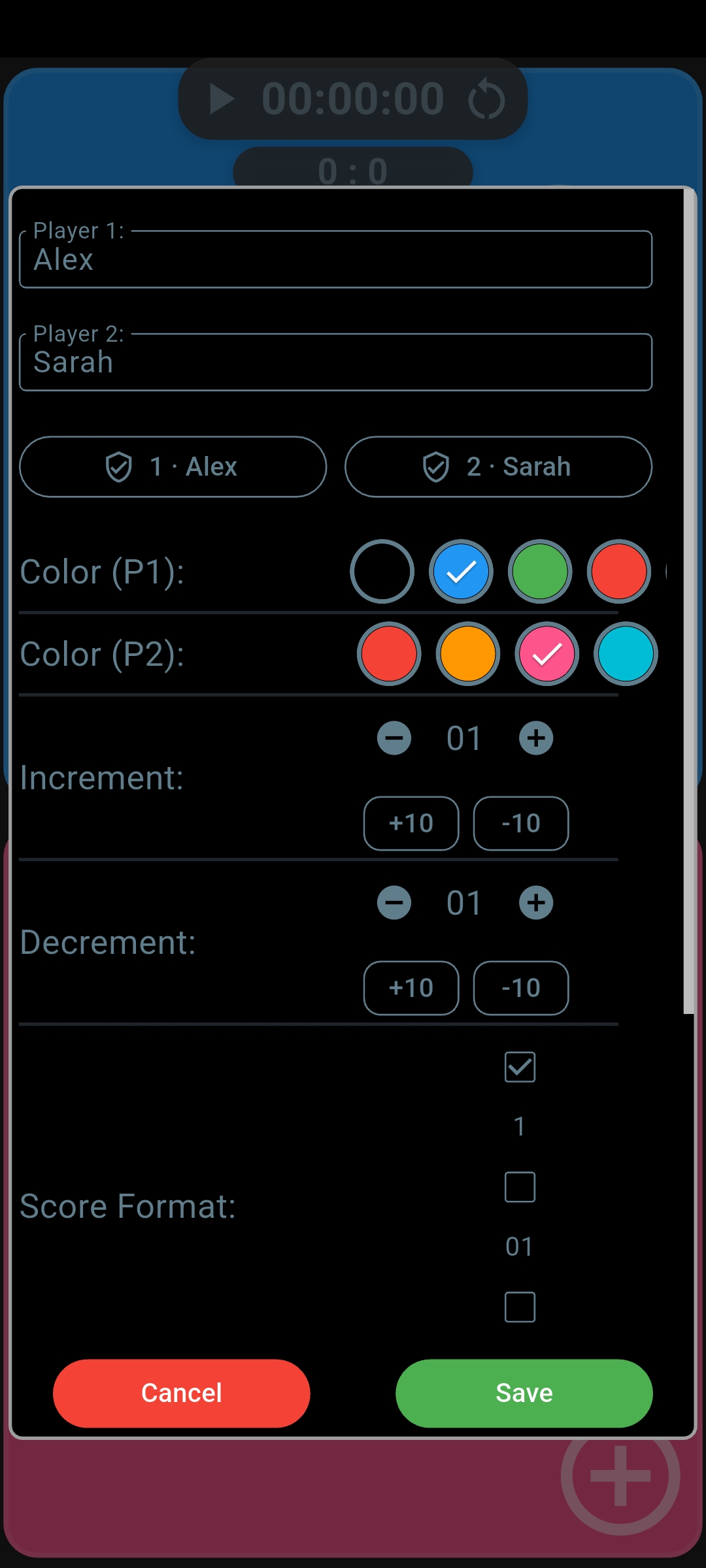
For one-point scoring, leave both amounts at 1. If each successful attempt earns five points, set Increment to 5. Setting Decrement to 5 as well makes it easy to reverse an accidental press with one tap. Tap Save to return to the board.
Once the board is ready, the player names and contrasting colors help you update the right side quickly, even when you’re keeping score for someone else’s game.
Add player profiles and avatars
For someone you play with regularly, create a reusable player profile in the app’s Profiles section using Create Profile. A profile stores their name, color and avatar, so you can bring those details into the next game.
In the 2 Player board’s settings, tap Select Profile for the relevant player and choose their saved profile. Tap Save to apply your selections. When you finish and save the match, the result also connects to the selected players’ records.
You can also personalize a player directly on the board: tap their avatar area to choose a built-in avatar or a custom one you’ve made with the app’s avatar creator. A familiar face or a favorite character makes each side easy to recognize during your next friendly rematch.
A two player score counter with quick corrections
Use the large plus button below a player’s score to add points, and the minus button to subtract them. Both sides use the point amounts you’ve chosen in settings.
Need to make a larger correction or start from a score you already know? Tap the large score number to open direct score entry. You can set the value there instead of pressing plus or minus repeatedly.
This is useful for games where points arrive throughout play: add a point for a correct quiz answer, record a successful attempt during a practice drill, or keep a running tally in a friendly tabletop challenge. You decide when points are awarded and update the matching side.
Keep the current score and rounds won separate
If you play several short games against the same opponent, you may want to follow both the current points and how many rounds each person has won. Turn on Show Rounds in settings to keep the round totals visible on the board.
Open the bottom controls to add or subtract rounds for either player. When you award a round, you can choose to reset the current point scores for the next one and have the app remember that choice.
That lets you start the next round with fresh points while keeping the round-win tally. The large numbers track the game in progress, and the smaller round counters keep the session in view.
Use a scoreboard app with timer for short challenges
A timer is useful when you want to see how long a game takes or give a practice challenge a fixed length. Scoreboard Plus lets you count up or use a countdown alongside the two scores.
Tap the timer display, or open the alarm-clock button in the bottom controls, to set it up. Choose the time and direction you need, then use the start, pause and reset controls during play. You can also enable the timer buzzer in settings.
For a timed quiz or practice round, set a countdown and update the scores as players earn points. If you’re simply curious how long a match lasts, count up from zero. The scores and timer stay together, so you can check them in one place.
Save the result before the next rematch
When you’re finished, open the bottom controls and tap the finish flag. Leave Save Match to History selected when you confirm. The saved result keeps both players’ point and round totals.
For regular opponents, select player profiles before you start. Saved results then connect to those players’ records, and Head-to-Head comparisons let you look back at their shared matches. It’s a useful way to keep a friendly rivalry going without relying on memory.
Frequently asked questions
Is the 2 player scoreboard included in the free download?
Yes. Scoreboard Plus is free to download on Android from Google Play, and the 2 Player mode is included. Open it to set up the two players and begin scoring.
Can I use it as a two player score keeper for board games?
Yes. The 2 Player mode suits board games and tabletop challenges where you want to update two running totals during play. Set the point amounts to fit your game and use the plus and minus controls to keep score.
Can I use the board in portrait or landscape?
Yes. The board has portrait and landscape layouts. Landscape places the two score panels side by side; portrait stacks them vertically, with the same point controls available.
Can I display the scoreboard on a TV?
Yes. Use your Android device’s screen mirroring feature to show Scoreboard Plus on a compatible TV. Keep updating the points on your phone or tablet while players and spectators follow the larger display.
Get your next head-to-head game ready
Playing with a bigger group next time? Explore the group and round-by-round modes in our Android scoreboard app.
Download Scoreboard Plus free on Google Play and open the 2 Player board. Set the players, choose your point values and keep scores, rounds and time together for your next friendly challenge.