Scoreboard Plus includes a dedicated table tennis scoreboard for Android that keeps your points, serving information and games together. It’s free to download, with options for a quick single game or a longer match.
When a rally ends, tap the winning player’s score. The board updates the score and who serves next, then follows the match as games are won. That gives you less to juggle during a lunchtime game, club practice or a friendly match at home.

Set up an 11-point game or a best-of-five match
Open the Table Tennis board in Scoreboard Plus and choose your settings before the first serve. You can name both players, give them different colors and avatars, or select saved profiles for regular opponents.
Three settings shape the match:
- Total Games: choose a single game or best of three, five or seven.
- Points per Game: choose 11 or 21.
- First Server: select the player who will serve first.
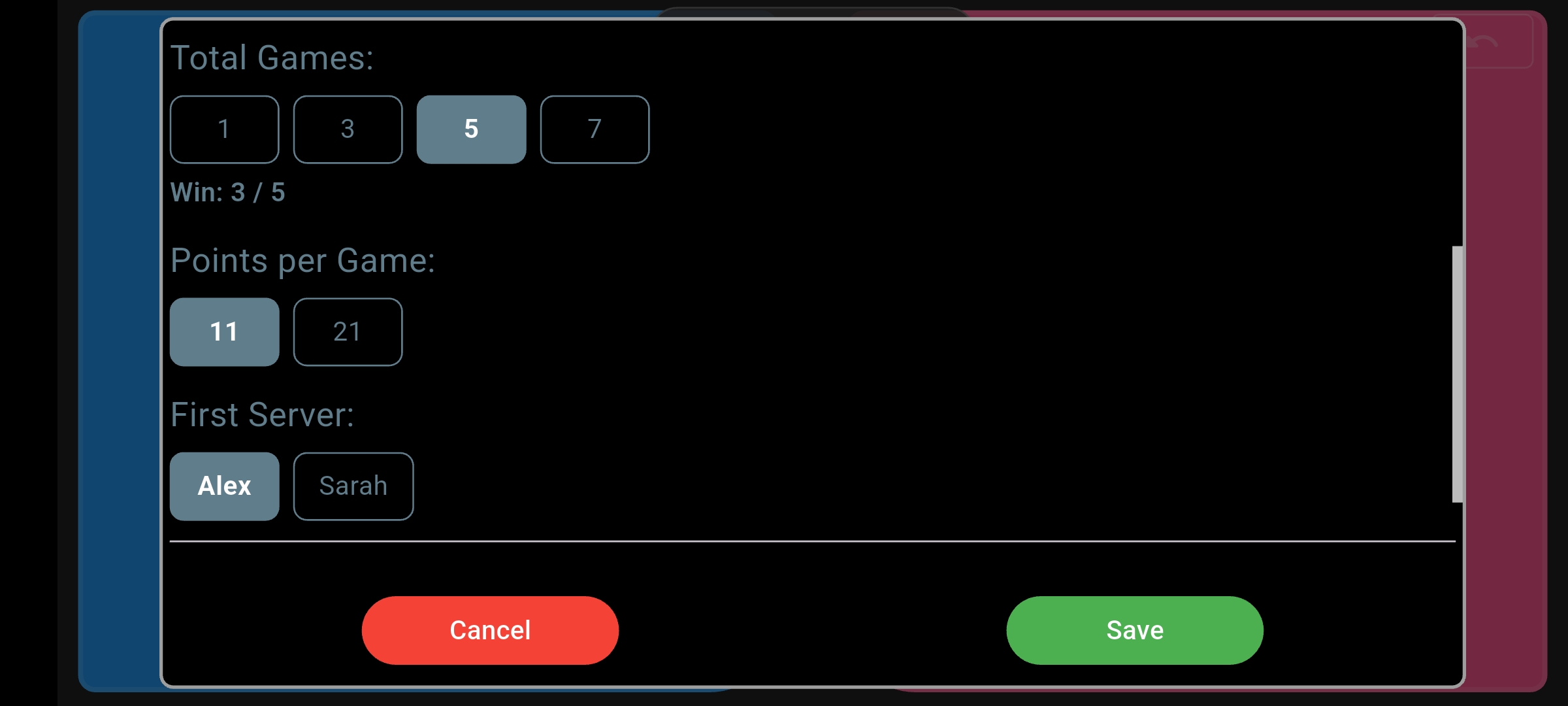
For a best-of-five match, select 5 under Total Games. The first player to win three games takes the match; you don’t have to play all five. Choose 1 when you just have time for a single game, or 7 for a longer contest.
A table tennis score counter that follows each rally
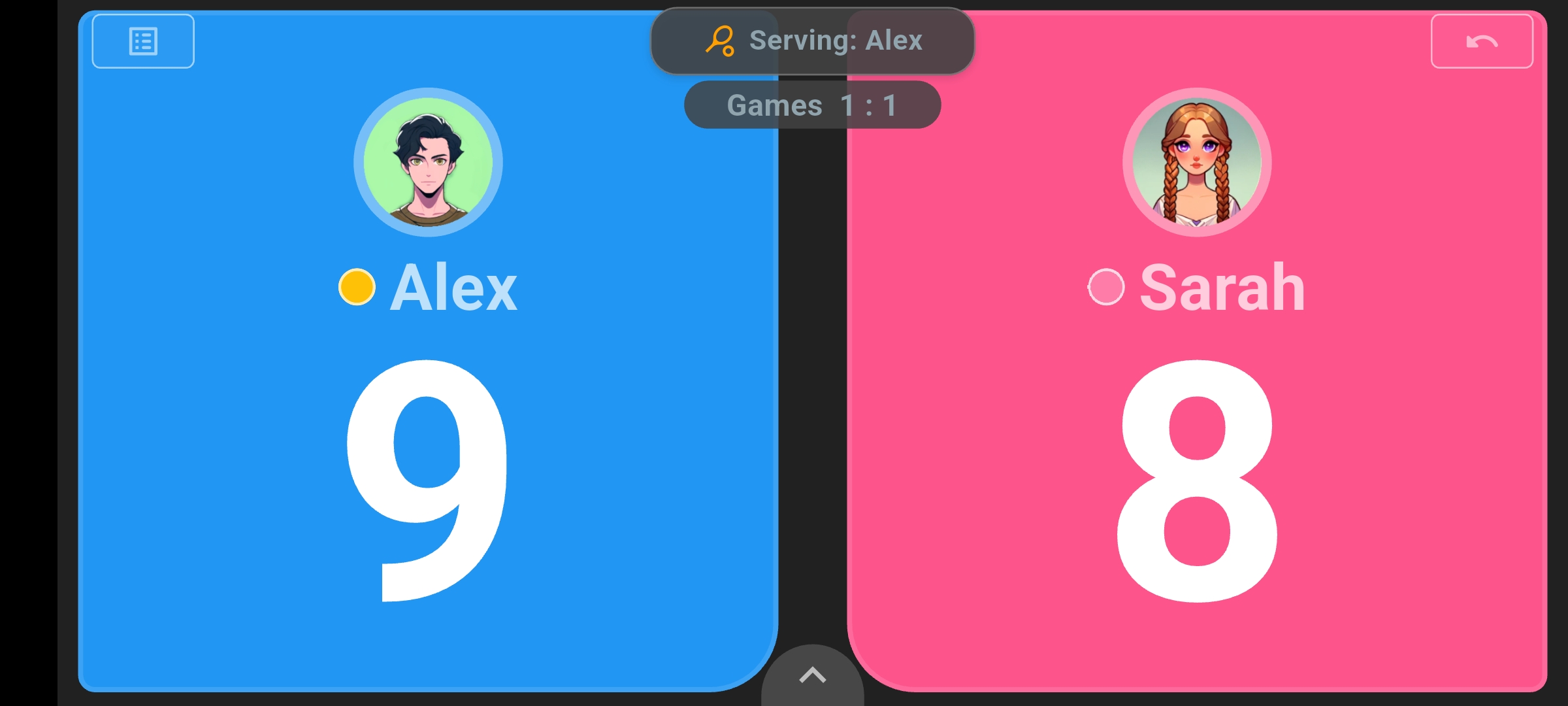
Tap the large score on the side of the player who won the rally to add a point. The landscape board keeps both scores prominent, with the serving player and games won visible above them.
The opening screenshot shows Alex leading the current game while the match is level at one game each. The serving label and highlighted marker show that Alex serves next. You can check all three things without leaving the board.
If you award a point to the wrong player or tap twice, use Undo in the top-right corner—or in the result dialog if the tap ended a game. It restores the previous score and serving state, including the game count if the mistaken tap ended a game. Then enter the correct point and carry on.
Let the board keep track of serving changes and deuce
Remembering whether someone has served once or twice is easy to lose track of during a close game. Scoreboard Plus updates the serving indicator as you enter points, so you can glance at the board before the next serve.
In an 11-point game, service changes every two points. At 10–10, it changes after every point, and play continues until one player leads by two. So 11–10 is still in progress, while 12–10 wins the game. These are the basic scoring and service rules described by Table Tennis England, and the board handles those changes from the points you enter.
Choose 21-point games and the board uses five-point service turns, switching to one point per turn at 20–20. The two-point winning margin still applies.
Follow the whole match, not just the current game
When a game is won, Scoreboard Plus records its result and updates the games won. It also recognizes when a player has won enough games to take the match, so a best-of-three or best-of-five session stays easy to follow.
Use the game-scores button in the top-left corner to open the results of completed games during the match. It’s useful when you remember who won the last game but not how close it was.
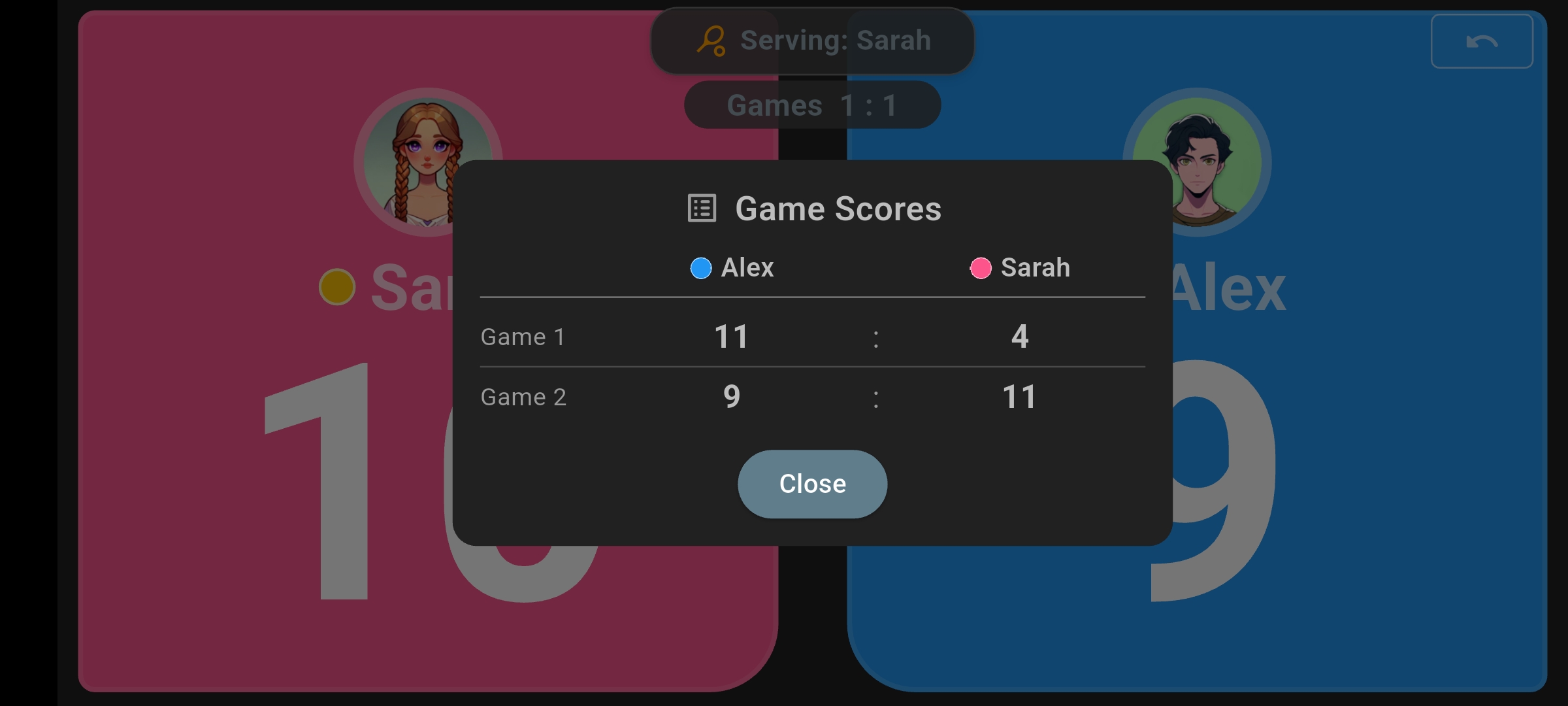
Here, Alex won the first game 11–4 and Sarah won the second 11–9. The Game Scores panel preserves those individual results while the main board tracks the game being played now.
Between games, a change-ends prompt lets you choose Change Ends or Keep Sides. When you change ends, the board swaps the player panels to match where you’re playing. It also prompts for the mid-game change in a deciding game.
Keep a record for your next rematch
A close match is worth remembering. When finishing, leave Save Match to History selected to keep the result. You can return to History later instead of relying on a message or a handwritten note.
Select player profiles before play to connect the saved match to each player’s statistics. Their table-tennis record can build up matches, wins, losses, games and points over time. Head-to-Head comparisons give regular opponents a way to look back at their shared results before the next friendly challenge.
Frequently asked questions
Can I use Scoreboard Plus as a free table tennis score keeper app?
Yes. Scoreboard Plus is free to download from Google Play and includes the dedicated Table Tennis board. Open that mode to set up players and start keeping score.
Can I use it as a ping pong scoreboard app?
Yes. Whether you call it ping pong or table tennis, use the Table Tennis mode for points, serving changes and games. It’s a handy board for matches with friends, family or colleagues.
Can this table tennis scoring app handle both 11-point and 21-point games?
Yes. Choose 11 or 21 under Points per Game before you start. The board adjusts the serving turns and deuce threshold to the selected format and applies a two-point winning margin.
Can I display the table tennis scoreboard on a TV?
Yes. Use your Android device’s screen mirroring feature to show Scoreboard Plus on a compatible TV. Keep entering points on your phone or tablet while the larger screen shows the score to players and spectators.
Get ready for the first serve
Playing something else after table tennis? Our Android scoreboard also has layouts for other sports and game nights.
To use Scoreboard Plus as a table tennis scoreboard app, download it free on Google Play and open the Table Tennis board. Choose the players and match format, then tap each rally winner to keep points, serving turns and games together.