A stair calculator app brings the connected measurements of a stair layout into one place: total rise, total run, step count, step height, tread depth, stringer length, and stair angle. You can begin with dimensions already chosen or start with the measured total rise and let the calculator find a whole step count.
Construction Calculator is included inside Unit Converter and provides both Manual and Automatic stair workflows. For anyone looking for a free stair calculator app, Unit Converter is free to download for Android, iPhone, and iPad, with feet-and-inches, fractional, decimal-inch, and metric measurement options.


Two ways to calculate a stair layout
Stair Manual is useful when the available total rise and total run are known and you have already chosen the number of steps. Enter those three values with the tread thickness, and the app calculates the individual step dimensions and related stringer results.
Stair Automatic starts from a different point. Enter the total rise, a target step height, tread thickness, and tread depth. The calculator selects a whole step count, recalculates the actual step height, and provides the resulting total run and stringer values.

How to calculate stair rise and run from known dimensions
Total rise is the full vertical distance covered by the stair. Total run is the available horizontal distance. In Manual mode, the chosen step count connects those overall dimensions to the height and depth of each step.
The basic relationships are:
Step height = total rise ÷ step count
Steps on stringer = step count − 1
Tread depth = total run ÷ steps on stringer
Construction Calculator performs these calculations while keeping feet, inches, and fractions readable. It also provides the first-step height, stringer placement, stringer length, and stair angle as connected result pages.
Enter rise, run, and steps in Manual mode
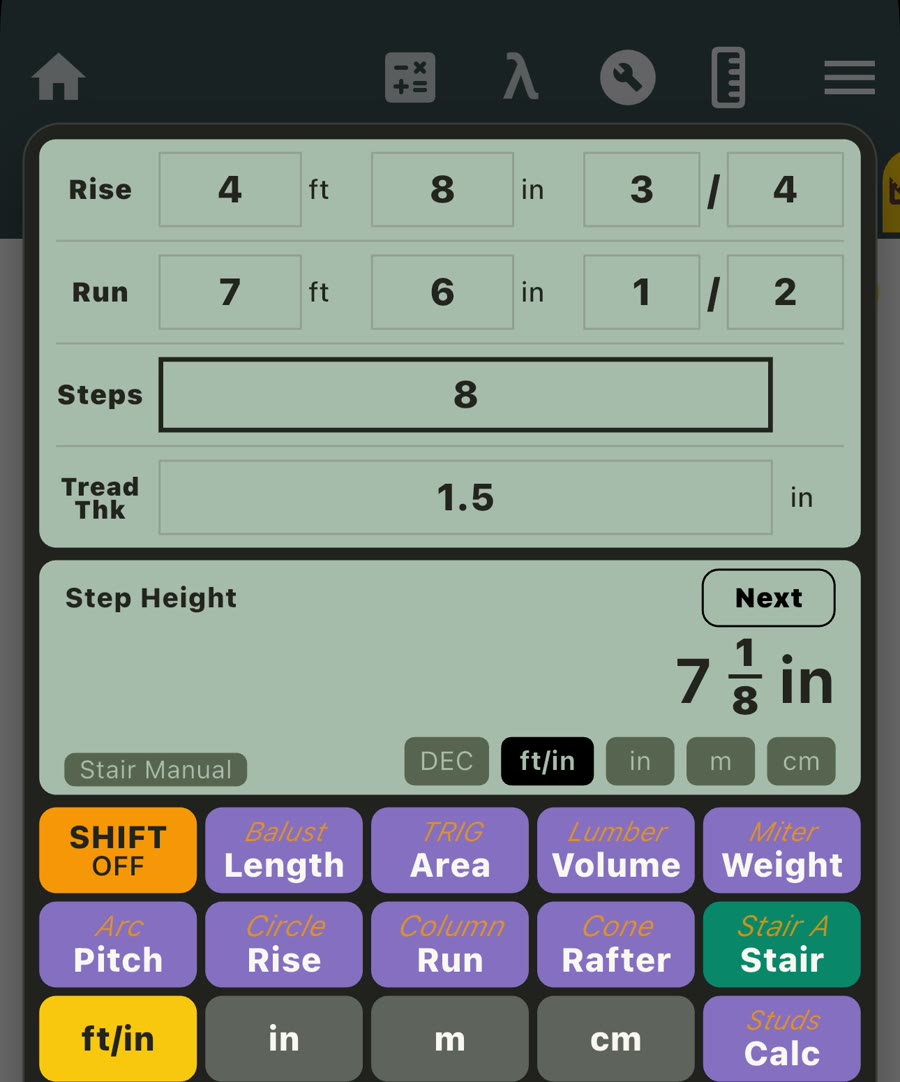
Consider a stair with a total rise of 4 ft 8 3/4 in, an available total run of 7 ft 6 1/2 in, and 8 steps. The tread material is 1 1/2 in thick.
- Open Construction Calculator and select Stair.
- Enter the total rise as 4 ft 8 3/4 in.
- Enter the total run as 7 ft 6 1/2 in.
- Enter 8 for Steps and 1.5 in for Tread Thickness.
- Read the step height, then press Next to review the remaining results.
For these inputs, the app calculates a 7 1/8 in step height and a 1 ft 0 15/16 in tread depth. It also reports 7 steps on the stringer, a 5 5/8 in first-step height, and an 8 5/8 in stringer-placement value.
Use the app to calculate stair stringer length
Continue through the result pages to reach the stringer length and stair angle. In the same Manual example, Construction Calculator shows a stringer length of 8 ft 6 1/2 in and a stair and rail angle of 28.75 degrees.

A useful stair stringer calculator keeps these values connected to the exact rise, run, step count, and tread thickness entered for the layout. This makes it easier to review the proposed geometry before transferring measurements to a full-size layout.
Use the calculated geometry to review the proposed layout, then confirm the final dimensions against your plans, field measurements, finished-floor and tread details, and local requirements before cutting.
Watch the stair layout calculation
See the Manual stair workflow from rise, run, step count, and tread thickness through the step-height, tread-depth, stringer-length, and angle results.
Calculate the number of stair steps automatically
When only the total rise is known, select Stair Automatic. This mode uses a target step height to choose a whole step count, then divides the total rise by that count to calculate the actual typical step height.
For example, enter a total rise of 4 ft 8 3/4 in and use a 7.5 in target step height, 1.5 in tread thickness, and 10 in tread depth. The app selects 8 steps and recalculates the typical step height as 7 1/8 in.
The connected pages show 7 steps on the stringer, a 5 5/8 in first-step height, an 8 5/8 in stringer-placement value, a 5 ft 10 in total run, a 7 ft 0 15/16 in stringer length, and a 35.35-degree stair and rail angle.
Manual or Automatic: which stair mode should you use?
- Use Stair Manual when total rise, available total run, and step count have already been chosen.
- Use Stair Automatic when total rise is known and you want the app to select a whole step count from a target step height.
Both modes present the related measurements one page at a time, so you can move from step dimensions to stringer values and angle without rebuilding the calculation.
Work with feet, inches, fractions, or metric units
The stair tools support FT/IN, decimal inches, meters, and centimeters for length values. In FT/IN mode, feet, inches, numerator, and denominator remain visible as separate entry positions, which is useful when total rise or run comes directly from a tape measurement.
Length results follow the selected result unit. For a closer look at entering and calculating dimensional measurements, see our feet and inches calculator app guide.
Who can use the stair tools?
Carpenters, framers, builders, remodelers, deck and porch builders, estimators, designers, and hands-on homeowners can use the two modes to explore stair geometry from the measurements available for a project.
Construction Calculator also includes focused tools for roof pitch and rafters, baluster spacing and stud layouts, lumber, miters, areas, volumes, weights, circles, arcs, and other common construction calculations.
What makes a useful mobile stair calculator?
- Two starting points: Use known rise, run, and steps, or begin with rise and a target step height.
- Readable dimensional entry: Work directly with feet, inches, and fractions instead of converting everything to decimals first.
- Connected results: Review step height, tread depth, stringer values, total run, and angle from the same inputs.
- Manual control: Test a selected step count against an available run.
- Automatic planning: Let the app choose a whole step count from the total rise and target height.
- Related project tools: Continue into measurement conversion and other construction workflows in the same app.
Frequently asked questions
Is there a free stair calculator app?
Yes. Unit Converter is free to download from Google Play and the App Store, and its built-in Construction Calculator includes both Manual and Automatic stair modes.
What measurements do I need for Manual mode?
Enter the total rise, total run, chosen number of steps, and tread thickness. The app calculates step height, tread depth, stringer-related values, and stair angle.
Can the app calculate how many stair steps I need?
Yes. Enter the total rise in Stair Automatic, then set the target step height, tread thickness, and tread depth. The app selects a whole step count and recalculates the actual step height and total run.
Does it calculate stair stringer length?
Yes. Stringer length is one of the result pages in both stair modes. Press Next to move through the calculated layout values.
Can I enter fractional-inch measurements?
Yes. FT/IN mode provides separate positions for feet, inches, numerator, and denominator. Decimal inches, meters, and centimeters are also supported.
Is Stair Calculator a separate download?
No separate download is needed. The stair tools are included in Construction Calculator inside Unit Converter.
Plan stair rise, run, steps, and stringer measurements
Choose the stair workflow that matches the dimensions you know, enter the measurements, and review the connected layout results. For the wider collection of building, layout, and dimensional tools, visit our Construction Calculator app guide.
Download Unit Converter on the App Store for iPhone or iPad, or get Unit Converter on Google Play for Android.