Selling a bead pattern means giving another maker more than a picture. They need to know which beads to gather, how to follow the design and what their purchase includes. Here is how to sell bead patterns on Etsy, from preparing a useful PDF to presenting it clearly in your listing.
Bead Designer, included in Knitting Row Counter, brings your design, charts, bead list and printable instructions together. You can also add your creator name and store information to the PDF. Knitting Row Counter is free to download for Android, iPhone and iPad.


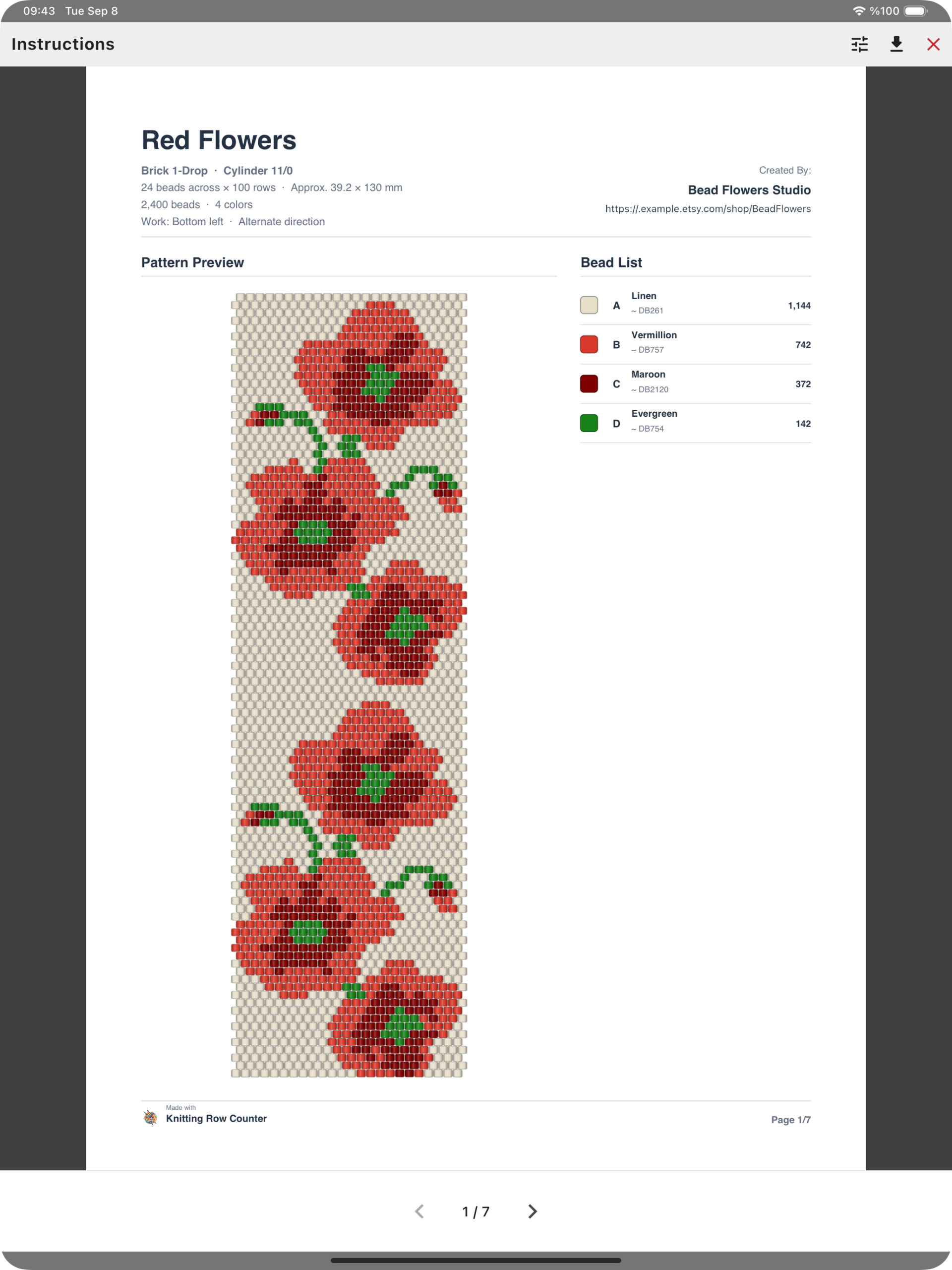
View the PDF overview at full size
1. Start with an original design and test it
Choose a design you have created, with a clear technique and purpose: a floral brick-stitch bracelet, a geometric loom band or a repeating peyote design, for example. Etsy allows sellers to offer their original designs as digital downloads under its Creativity Standards.
Before preparing the listing, check the colors, dimensions and beadwork technique. Make a sample where practical, or ask another beader to test the pattern. Pay attention to the places where they pause or ask a question; those are useful clues about what your instructions or listing should explain.
2. Create a bead pattern PDF buyers can follow
Using beading pattern software keeps the design and its working instructions connected. In Bead Designer, you can prepare a document directly from the finished pattern, with the information a customer needs beside their bead mat:
- Pattern details: the design name, technique, bead profile, dimensions and approximate beadwork size.
- A design preview: a clear view of the complete pattern.
- A bead list: color names, quantities and optional bead reference codes.
- A numbered chart: bead positions with optional color letters.
- Pickup instructions: row-by-row color sequences, bead quantities, direction arrows and completion checkboxes.
Include bead reference codes as well as color names
A name such as red or green gives someone a general idea of a palette. A reference code gives them another useful detail to look up when preparing their supplies. Turn on Show bead code in Document settings to include the available codes beside the bead names, as shown in the first-page example above.
These are different from the chart letters. Letters such as A, B, C and D connect positions in the pattern to the bead list; reference codes help identify the listed colors. Keeping the names, codes and quantities together makes the list more useful when a buyer is sorting their stash or planning a bead order.
3. Add your creator name and Etsy shop information
A customer may return to a downloaded pattern months after buying it. Adding your identity to the document makes it easier to remember who designed it and where to find more of your work.
Open Document settings and fill in Name or brand with the name you want customers to recognize. Use Store info for your Etsy shop URL or other relevant store information. The Red Flowers example shows Bead Flowers Studio and an example shop address on the first page; the creator name also appears on the chart and instruction pages.
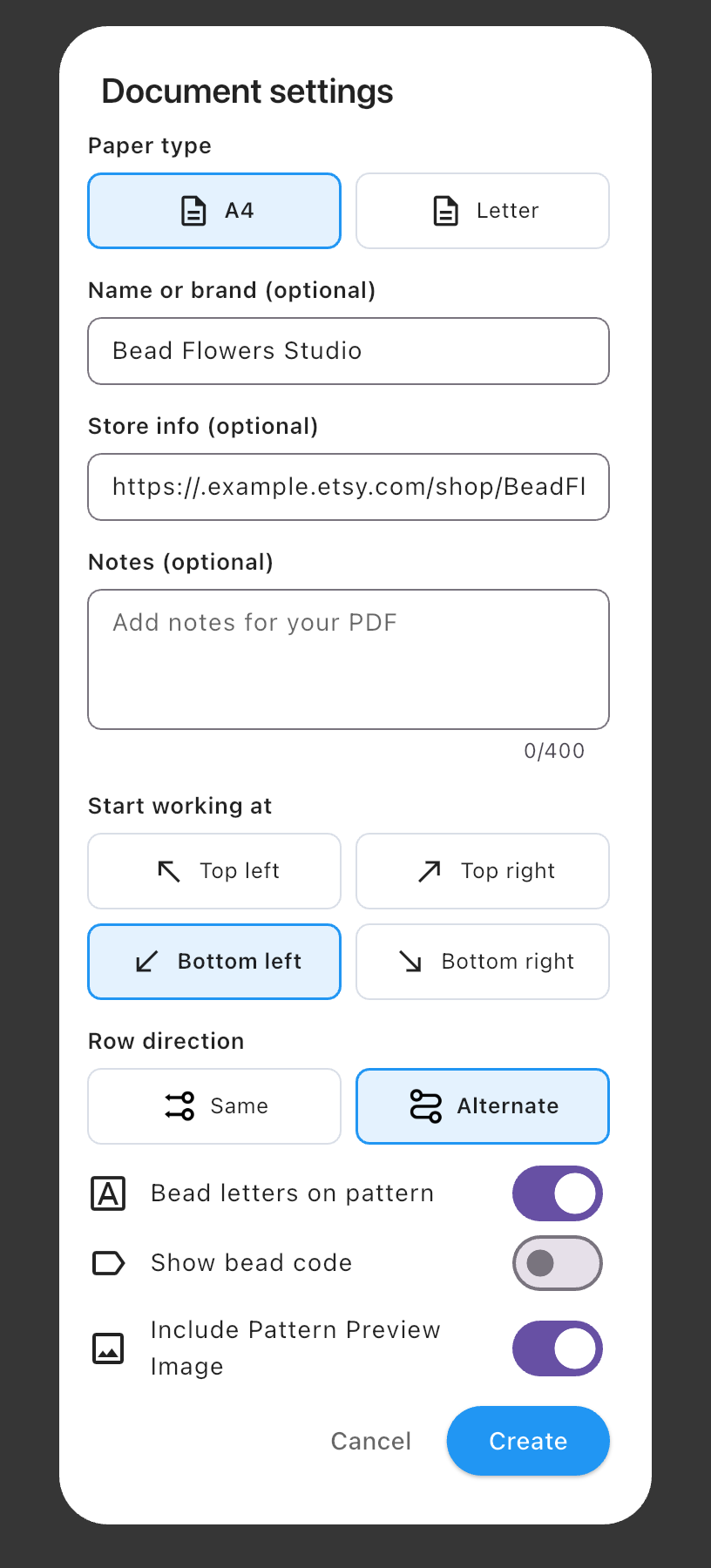
View the document settings at full size
You can also add a short message in Notes and choose A4 or US Letter paper. Use the same creator name across your listing and document so they feel like parts of the same shop.
4. Review the chart and pickup instructions
The chart gives buyers a visual map of the design. Row numbers help them locate their place, and bead letters give them another way to distinguish colors. Before exporting, check that the starting corner and working direction match the way you want the pattern followed.
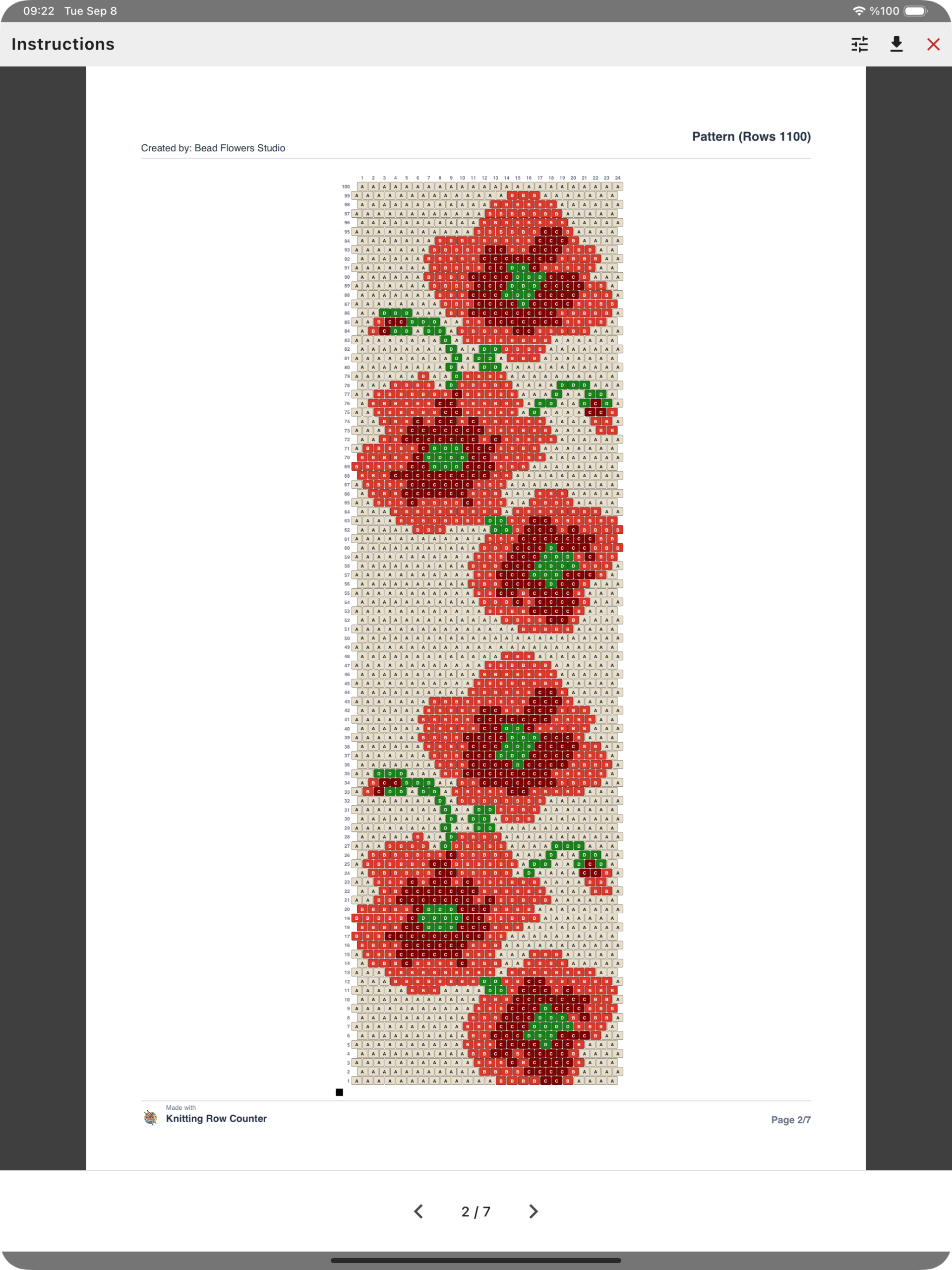
The pickup pages provide a different way to follow the same design: a sequence of colors and quantities for each row, with arrows indicating direction. Checkboxes give someone working from a printed copy a place to mark completed rows.
Review the pages before saving the file, then open the saved PDF to check the buyer-facing copy. For the full export walkthrough, see how to create a bead pattern PDF with printable instructions.
5. Prepare an Etsy listing that shows what buyers receive
Lead with a clear preview of the design. Add supporting images that show selected PDF details, such as the bead list, a section of the chart and a few instruction rows. These help a buyer understand both the style of the pattern and how they will use it.
Make PDF pattern — digital download easy to spot in your listing images and description. State that the purchase is a pattern, rather than a finished bracelet or a bead kit. Include:
- the beadwork technique and experience level the project is intended for;
- the bead type and size, plus the dimensions of the beadwork;
- the files, charts and instructions included;
- the paper format and any additional instructions you have prepared.
Use a specific, readable title. For this example, Red Flower Brick Stitch Bracelet Pattern — PDF Beading Chart tells a shopper the motif, technique and type of product. Etsy’s current title guidance favors clarity and relevant identifying details over repeated keyword lists. Use relevant phrases in your tags and description too, without repeating the same wording everywhere.
When choosing a price, compare patterns with a similar technique, complexity and package of instructions. Consider the work you put into designing, testing and presenting your own pattern, not just the lowest price you find.
6. Upload the PDF as a digital download
To sell digital patterns on Etsy as instant downloads, select Digital files when creating the listing and upload the finished files the buyer will receive. Etsy supports PDF uploads and currently allows up to five files per listing, with a maximum of 20 MB each. See Etsy’s digital-listing instructions for the current requirements.
Name the file clearly before uploading it; buyers see that filename. For example, Red-Flowers-Brick-Stitch-A4.pdf is easier to recognize than a generic export name. If you include both A4 and Letter editions, label them so customers can choose the appropriate file.
A quick check before listing your pattern
Use this six-step checklist to review both the pattern you are selling and the way you present it.
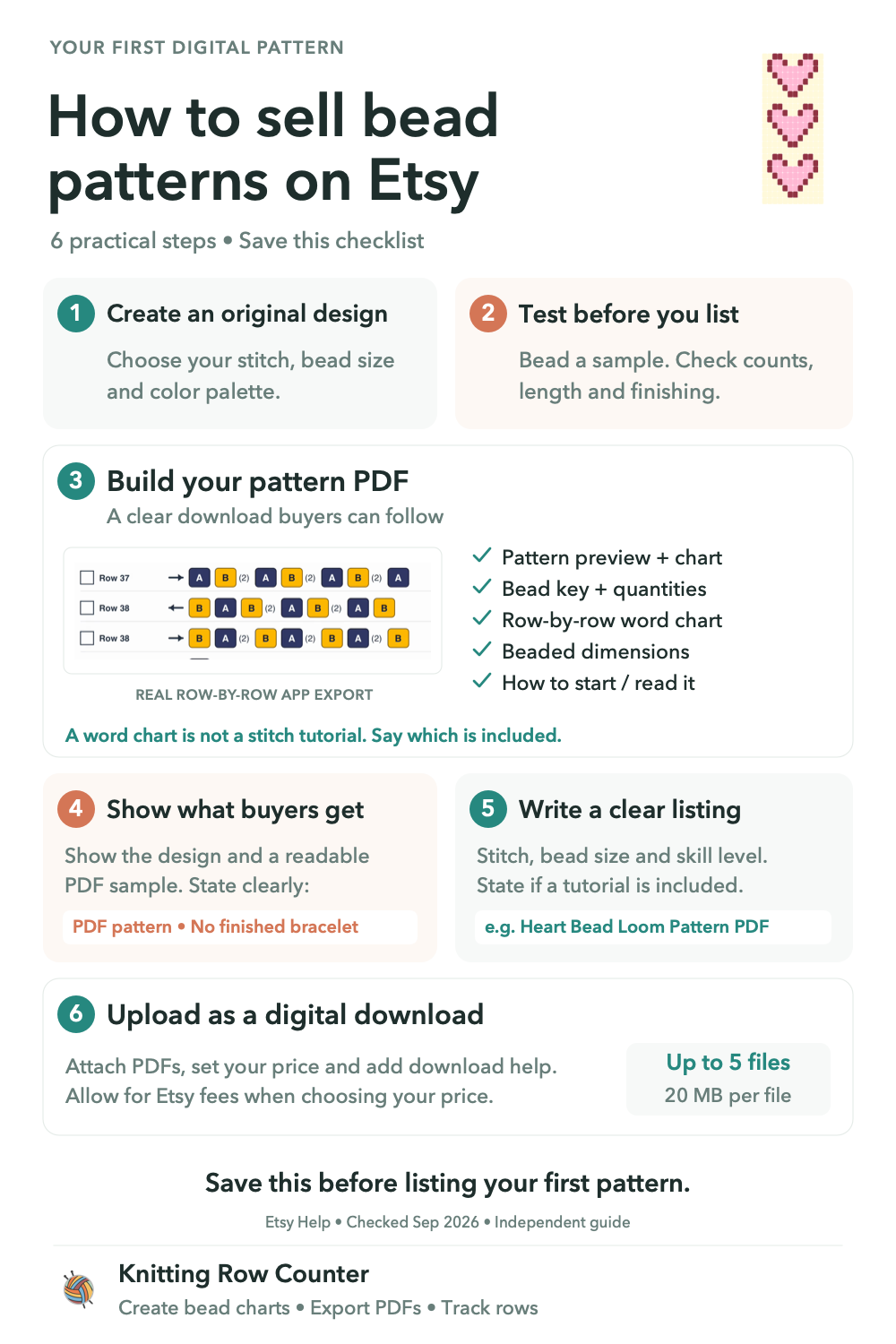
- Choose an original design. Set the stitch, bead size and color palette. Make sure the pattern details and bead list describe the version you plan to sell.
- Test the pattern and the finishing. Bead a sample and check the counts, finished length, ends and chosen closure. Work through the instructions as a buyer would.
- Build a useful pattern PDF. Include the preview, readable chart, bead key, quantities, reference codes, dimensions and row-by-row pickup instructions. Explain where to start and how to read the chart. Check your creator name and shop information too.
- Show what buyers receive. Use a clear design preview and a readable sample of the PDF. State that the purchase is a digital pattern, not a finished bracelet or bead kit.
- Describe the instructions accurately. Name the stitch, bead size and expected skill level. A word chart gives the bead sequence; a stitch tutorial teaches the technique. Say whether your download includes a stitch tutorial and finishing guidance, so buyers know what to expect.
- Check delivery and pricing. Open the exported files, give them recognizable names and confirm they meet the upload requirements above. Allow for Etsy fees when choosing your price, and provide a short download-help note.
For that note, point buyers to Etsy’s download instructions. Buyers with an account can download available files from Purchases on Etsy.com using a web browser; guest buyers can use the download link in their receipt email.
Frequently asked questions
Can I put my Etsy shop URL in the pattern PDF?
Yes. Enter your shop URL in Store info and your creator or shop name in Name or brand. The document can display those details with the pattern overview, giving customers a reference back to your shop.
Can the bead list include color codes and quantities?
Yes. The bead list shows color names and quantities, and the Show bead code option adds bead reference codes. Optional letters on the chart connect bead positions to the corresponding entries in that list.
Can I prepare both A4 and US Letter versions?
Yes. Choose the paper size in Document settings and export each version with a clear filename. Mention both formats in your listing if you include both files.
Prepare your next pattern with Bead Designer
Bring your original design, bead list, instructions and creator details together in one document. Explore Bead Designer inside Knitting Row Counter on the App Store or Google Play.