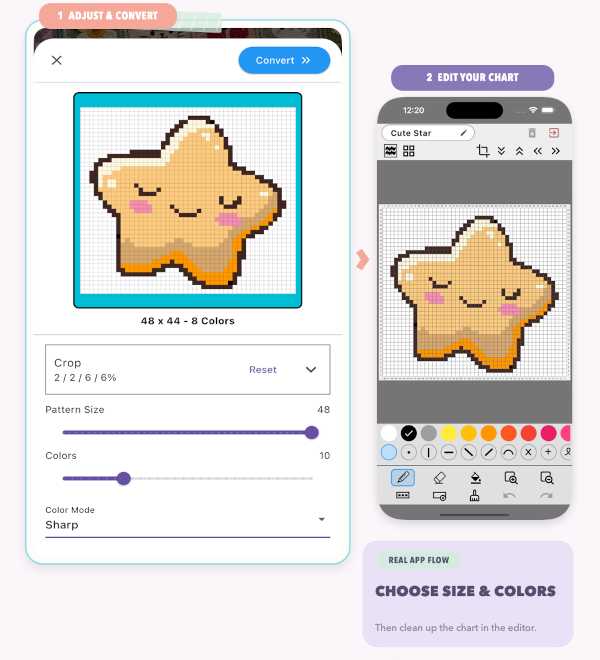
Pattern/Chart Designer is a powerful chart editor for creating knitting stitch charts. Design with colors and symbols, generate charts from images, preview the finished knitted fabric in Stitch View, and use Repeat View to see how your chart looks when repeated across a larger pattern.


Main Areas
- Pattern name and top controls: Stitch view, tile preview, crop, and shift functions.
- Editable grid
- Color selector
- Icon/symbol selector
- Action toolbar
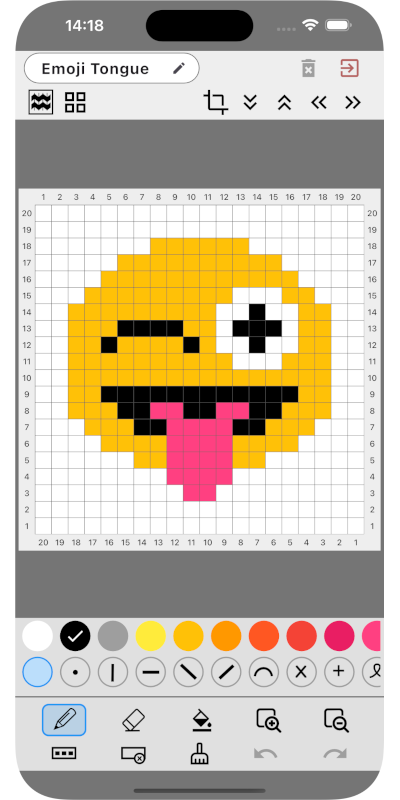
Grid Basics
- Tap a cell to apply selected color + icon
- Active row/column highlighting helps orientation
- Edge labels support row and column counting
Toolbar Actions
- Erase cell
- Zoom in / reset zoom
- Fill all / clear all
- Fill active row / clear active row
- Undo / redo
Editing tip: Build shape first, then add symbols where stitch behavior matters most.
Example: For a heart motif, keep background simple and apply symbols only to special stitch zones for better readability in work mode.
Quick Links to Guides
- Knitting Row Counter Manual
- Getting Started with Knitting Row Counter
- Create or Edit a Project
- Edit Part
- Edit Counter
- Edit Reminder
- Work on a Knitting Project
- Work Mode: Notes and Project Info
- Work Mode: Files (Images and PDF)
- Pattern Home Screen
- Pattern Designer
- Work on Pattern
- Built-in Knitting Tools
- Stats and Streak Calendar
- FAQ and Troubleshooting