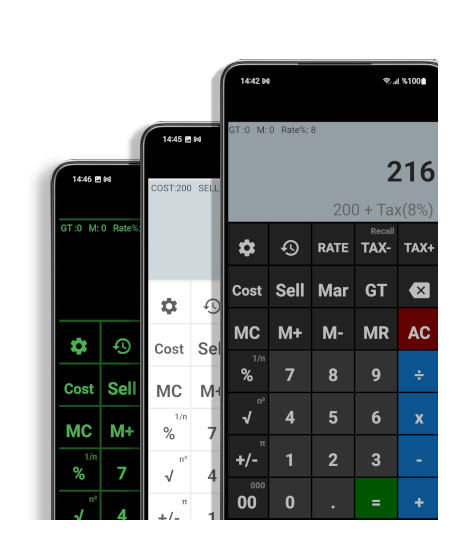
The Simple Calculator works like electronic Casio calculators we use in our workplace. It is great for business owners, billing work, and home use.
Key Features:
- Large Display, Clear layout
- Percentage Operations
- MC, MR, M+, M- Memory keys, memory content is always visible on top
- Cost/Sell/Margin & Tax Keys
- Results history
- Color Themes
- Adjustable decimal places, and number format
It has percentage, memory, tax, and business functions so that you can calculate cost, sell and profit margin with a few taps.
The calculator comes with several color themes, customizable number format, adjustable decimal places, and results history.
How to Calculate Cost, Margin, and Sell Functions on Calculators
| To calculate Cost | What is the cost of an item that sells for $150 with a %30 margin added? |
| [AC] 150 | [SELL] |
| 30 | [MARGIN] |
| [COST] | 105 |
| To calculate selling price | What is the selling price of an item that costs $120 after a %40 margin is added? |
| [AC] 120 | [COST] |
| 40 | [MARGIN] |
| [SELL] | 200 |
| To calculate Margin | What is the margin on an item that costs $800 and sells for $2000? |
| [AC] 800 | [COST] |
| 2000 | [SELL] |
| [MARGIN] | 60% |
How to use the Memory buttons on the calculator?
Memory buttons on Simple Calculator allow you to store and recall numbers for use in your calculations. Here is how you can use them:
- To store a number in memory, enter the number that you want to store and then press the “M+” (memory plus) button. This will add the number to the current value stored in memory.
- To recall a number from memory, press the “MR” (memory recall) button. This will retrieve the value stored in memory and display it on the calculator.
- To clear the memory, press the “MC” (memory clear) button. This will reset the memory to zero.
- To add the displayed number or calculation result to memory, press “M+”. To subtract it from memory, press “M-” (memory minus). Press “MR” to recall the stored total.
I hope this helps! Let me know if you have any questions about other functions.