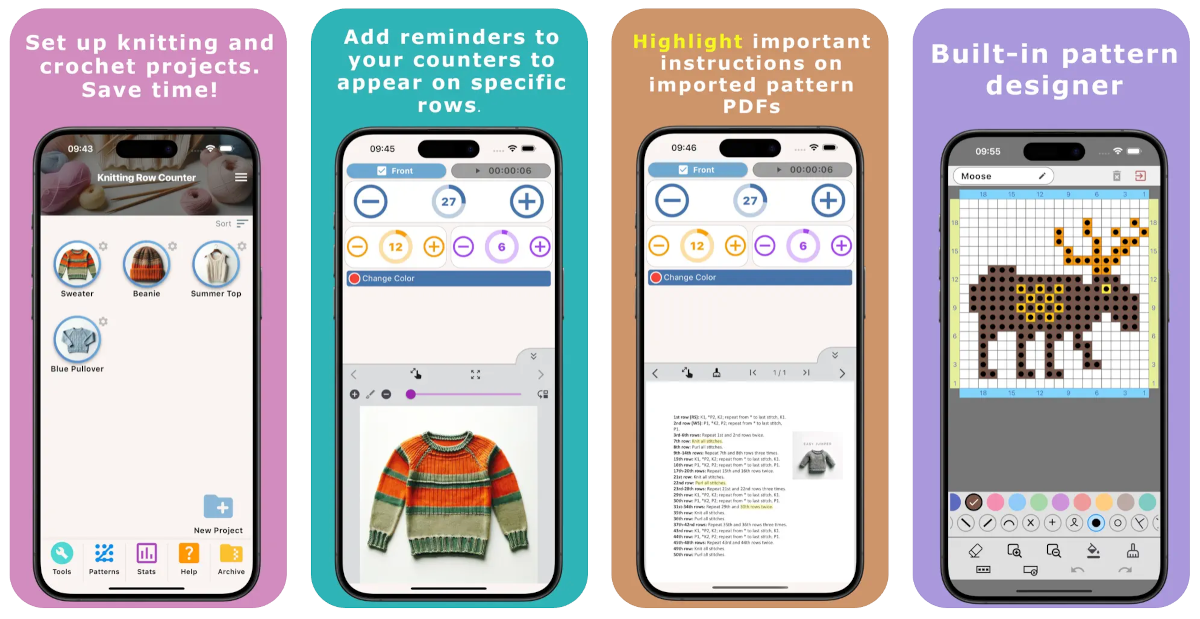
Welcome. This manual is designed to help you get comfortable with Knitting Row Counter quickly, even if this is your first dedicated knitting app.
Knitting Row Counter keeps project details, row tracking, reminders, notes, and pattern files in one place, so you can focus on knitting instead of juggling multiple tools.
What You Can Do in the App
- Organize projects by parts (for example: Front, Back, Sleeves)
- Track progress with a main Row counter and optional secondary counters
- Add reminders for exact rows, row ranges, or repeating intervals
- Keep part notes and project notes available while knitting
- Use pattern images and PDF files inside work mode
- Use built-in tools and pattern chart features
Quick Links to Guides
- Getting Started with Knitting Row Counter
- Create or Edit a Project
- Edit Part
- Edit Counter
- Edit Reminder
- Work on a Knitting Project
- Work Mode: Notes and Project Info
- Work Mode: Files (Images and PDF)
- Pattern Home Screen
- Pattern Designer
- Work on Pattern
- Built-in Knitting Tools
- Stats and Streak Calendar
- FAQ and Troubleshooting
How to Use a Knitting Counter (and Why It Helps)
Using a knitting counter is one of the easiest ways to reduce mistakes and knit with less stress. A clear counter workflow helps you keep your place, especially in shaping and repeat-heavy patterns.
Why It Is a Good Idea
- Prevents losing your place after interruptions
- Makes shaping and repeats easier to follow
- Improves consistency across multi-part projects
- Reduces mental load during long sessions
How Counters and Reminders Work Together
- Main counter: tracks total progress for the current part
- Secondary counter: tracks repeats like color cycles or motif cycles
- Reminders: show instructions at the right row or row range
This combination helps you do the right action at the right time, with fewer missed decreases, color changes, or transitions.
Example: For a sleeve with stripe changes every 6 rows and decreases every 8 rows, use the main Knitting Counter for total rows, a secondary counter for stripe rhythm, and reminders for decrease rows.
How to Use This Manual
- New user: start with Getting Started
- Project setup: Create or Edit a Project
- Live knitting: Work on a Project
- Chart workflow: Pattern Home, Pattern Designer, Work on Pattern
- Conversions: Tools