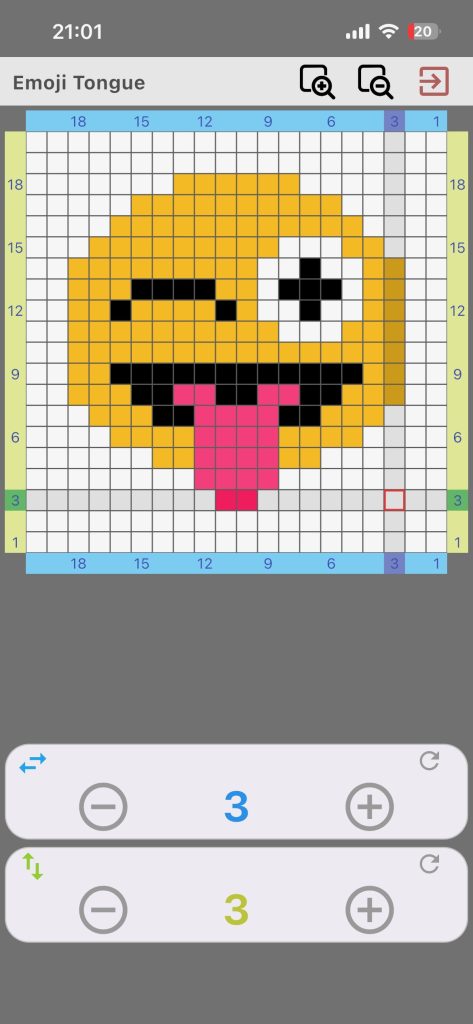
Work on Pattern mode is the live chart-following screen. It focuses on execution, not editing, to edit a pattern use pattern editing screen.
What This Mode Includes
- Read-only chart display
- Current row and column tracking
- Row counter controls
- Column counter controls
- Reset options for both counters
Why Row + Column Tracking Helps
A normal Row counter is linear. Chart knitting often needs exact two-dimensional position. This mode helps you keep visual position with fewer mistakes.
Suggested Workflow
- Open your pattern.
- Set row and column to your current position.
- Knit while moving counters as you progress.
- Save and exit when your session ends.
Example: In colorwork, move the column counter stitch by stitch, then reset column and increment row at row end.


Quick Links to Guides
- Knitting Row Counter Manual
- Getting Started with Knitting Row Counter
- Create or Edit a Project
- Edit Part
- Edit Counter
- Edit Reminder
- Work on a Knitting Project
- Work Mode: Notes and Project Info
- Work Mode: Files (Images and PDF)
- Pattern Home Screen
- Pattern Designer
- Work on Pattern
- Built-in Knitting Tools
- Stats and Streak Calendar
- FAQ and Troubleshooting