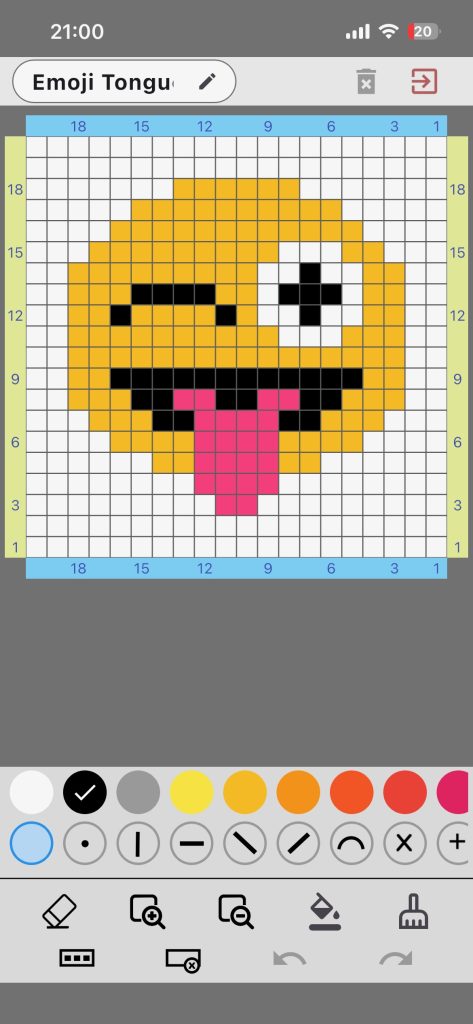
Pattern Designer is your chart editor in Knitting Row Counter. It lets you build and adjust stitch charts with colors and symbols.
Main Areas
- Pattern name and top controls
- Editable grid
- Color selector
- Icon/symbol selector
- Action toolbar
Grid Basics
- Tap a cell to apply selected color + icon
- Active row/column highlighting helps orientation
- Edge labels support row and column counting
Toolbar Actions
- Erase cell
- Zoom in / reset zoom
- Fill all / clear all
- Fill active row / clear active row
- Undo / redo
Editing tip: Build shape first, then add symbols where stitch behavior matters most.
Example: For a heart motif, keep background simple and apply symbols only to special stitch zones for better readability in work mode.


Quick Links to Guides
- Knitting Row Counter Manual
- Getting Started with Knitting Row Counter
- Create or Edit a Project
- Edit Part
- Edit Counter
- Edit Reminder
- Work on a Knitting Project
- Work Mode: Notes and Project Info
- Work Mode: Files (Images and PDF)
- Pattern Home Screen
- Pattern Designer
- Work on Pattern
- Built-in Knitting Tools
- Stats and Streak Calendar
- FAQ and Troubleshooting