This page helps you set up your first project and start using your Row counter with confidence.
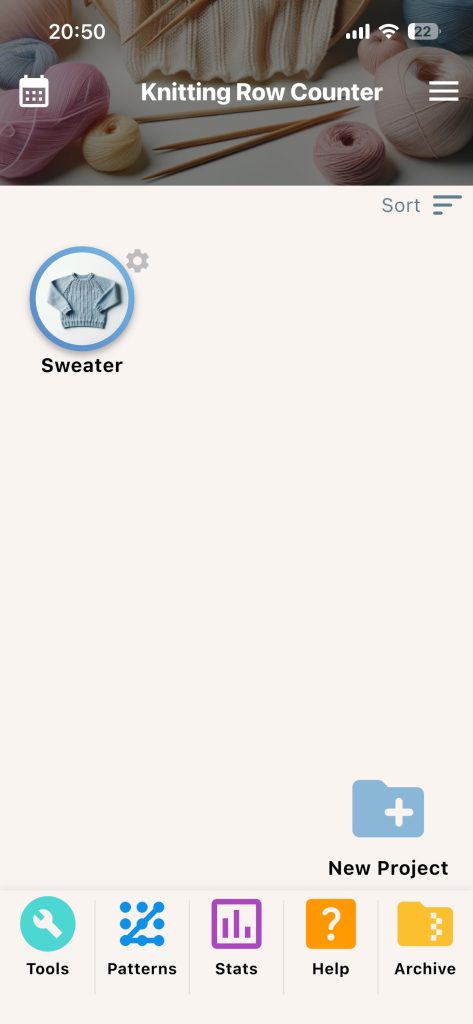
Home Screen Overview
- Project cards: each card is one project
- New Project button: creates a project
- Bottom shortcuts: Tools, Patterns, Stats, Help, Archive
- Calendar icon: opens streak calendar
- Sort option: reorder projects by recent use, name, or creation
Create Your First Project
- Tap New Project.
- Enter a clear project name.
- Add at least one part.
- Open the part and set your main counter target.
- Save and return to home.
- Tap the project card to enter work mode.
Helpful Early Settings
- Sound on/off for feedback
- Keep screen on for long knitting sessions
- Dark mode
- Language preference
Naming Tip
Specific names are easier to find later.
- Good: Blue Cable Sweater
- Good: Chevron Baby Blanket
- Avoid: Project 1
Example: For a scarf, create one part named Scarf Body, set your target rows, then use the Knitting Counter in work mode for row-by-row tracking.


Quick Links to Guides
- Knitting Row Counter Manual
- Getting Started with Knitting Row Counter
- Create or Edit a Project
- Edit Part
- Edit Counter
- Edit Reminder
- Work on a Knitting Project
- Work Mode: Notes and Project Info
- Work Mode: Files (Images and PDF)
- Pattern Home Screen
- Pattern Designer
- Work on Pattern
- Built-in Knitting Tools
- Stats and Streak Calendar
- FAQ and Troubleshooting