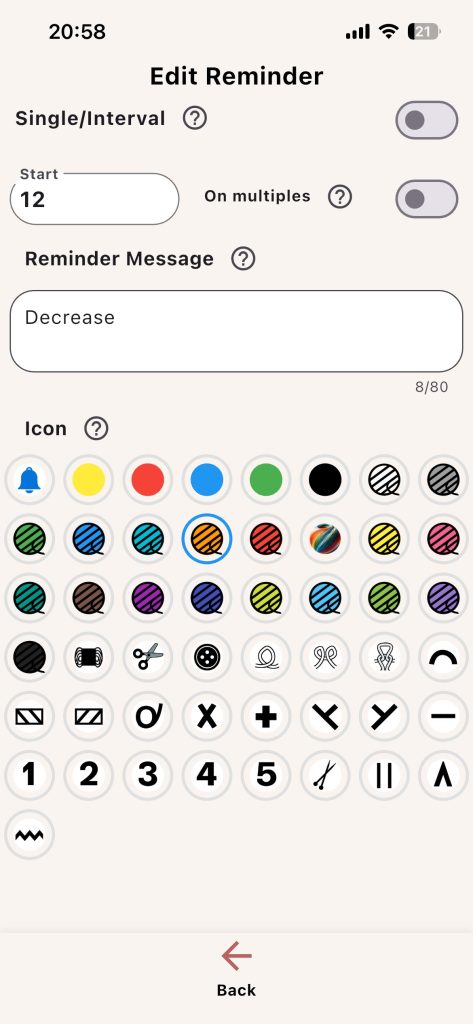
Reminders are one of the most practical features in Knitting Row Counter. They help you act at the right row without rechecking your pattern constantly.
Reminder Settings
- Single/Interval mode
- Start value
- End value (interval mode)
- On multiples (single mode)
- Reminder message text
- Reminder icon
Trigger Logic
- Single mode: reminder appears at one exact row
- Interval mode: reminder appears across a row range
- On multiples: reminder repeats based on Start value
Message Writing Tip
Use short action text:
- Start decreases
- Switch to color B
- Change needle size
Example: If a pattern says “decrease every 6th row,” set Single mode with Start = 6 and enable On multiples. Your Row counter will trigger reminders at 6, 12, 18, and so on.


Quick Links to Guides
- Knitting Row Counter Manual
- Getting Started with Knitting Row Counter
- Create or Edit a Project
- Edit Part
- Edit Counter
- Edit Reminder
- Work on a Knitting Project
- Work Mode: Notes and Project Info
- Work Mode: Files (Images and PDF)
- Pattern Home Screen
- Pattern Designer
- Work on Pattern
- Built-in Knitting Tools
- Stats and Streak Calendar
- FAQ and Troubleshooting