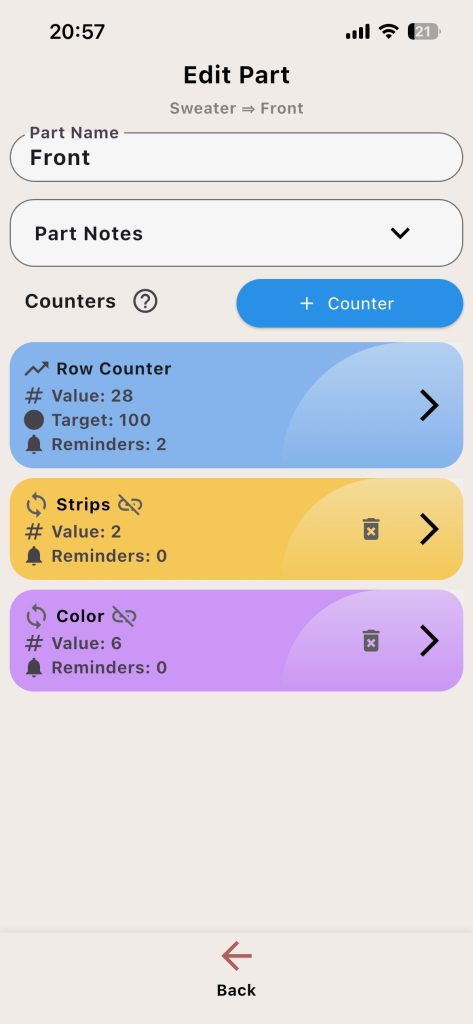
A part represents one section of your project. Good part setup makes your Knitting Counter workflow clearer and more reliable.
What You Can Edit
- Part name
- Part notes
- Counter list for that part
Counter Structure Inside a Part
- Main counter: primary Row counter for total part progress
- Secondary counters: repeat tracking (stripes, motifs, shaping cycles)
- Click edit icon near the counters to edit a counter.
Useful Part Notes
- Needle changes
- Color changes
- Repeat instructions
- Shaping checkpoints
Suggested Workflow
- Name the part clearly.
- Add short actionable notes.
- Open each counter and configure behavior.
- Repeat for other parts.
Example: In a sock project, create a part named Heel Flap. Use main counter for total rows and a secondary counter for a 2-row slip-stitch repeat.


Quick Links to Guides
- Knitting Row Counter Manual
- Getting Started with Knitting Row Counter
- Create or Edit a Project
- Edit Part
- Edit Counter
- Edit Reminder
- Work on a Knitting Project
- Work Mode: Notes and Project Info
- Work Mode: Files (Images and PDF)
- Pattern Home Screen
- Pattern Designer
- Work on Pattern
- Built-in Knitting Tools
- Stats and Streak Calendar
- FAQ and Troubleshooting