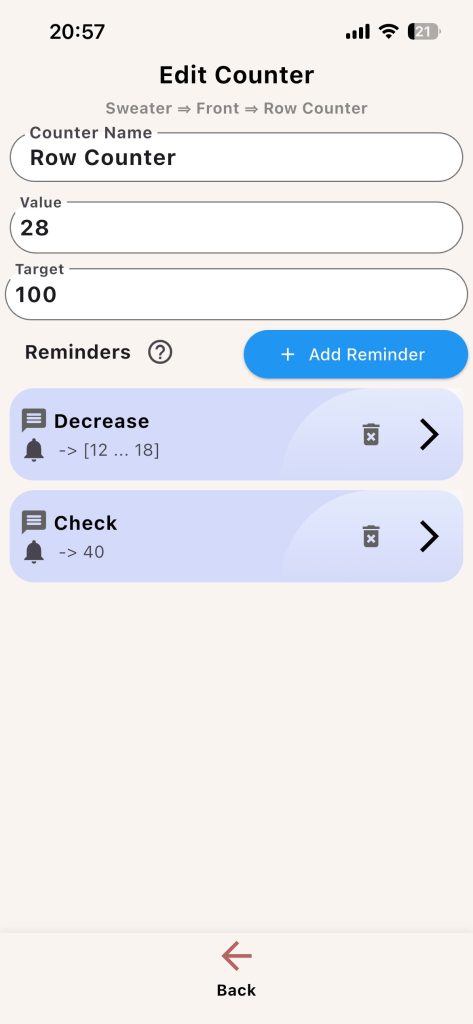
Use this screen to define exactly how your counter behaves during knitting.
Core Fields
- Counter name
- Current value
- Target value (main counter)
Secondary Counter Options
- Reset after row
- Link to global counter
- Show reset count
Reminder Controls
- Add Reminder
- Edit Reminder
- Delete Reminder
How to Choose Counter Design
- Use the main counter for total part progress.
- Add secondary counters only when they solve a real tracking need.
- Use link-to-global when repeats should advance with every main row.
Example: For a lace repeat every 12 rows, create a secondary counter named Lace Repeat, set reset-after-row to 12, and link it to the main Row counter if you want automatic movement.


Quick Links to Guides
- Knitting Row Counter Manual
- Getting Started with Knitting Row Counter
- Create or Edit a Project
- Edit Part
- Edit Counter
- Edit Reminder
- Work on a Knitting Project
- Work Mode: Notes and Project Info
- Work Mode: Files (Images and PDF)
- Pattern Home Screen
- Pattern Designer
- Work on Pattern
- Built-in Knitting Tools
- Stats and Streak Calendar
- FAQ and Troubleshooting